Showing posts with label SQL. Show all posts

Friday, 29 January 2016

10 Best Programming Languages of 2015

1. Java
Java is considered as the perfect language for the developers and programmers to learn. Currently it is the top-most programming language and has grabbed the highest position with Android OS yet again, though it was a bit down a few years ago. Java can be utilized for mobile-based applications, enterprise level purpose, for creating desktop applications, and for establishing Android apps on tablets and smartphones.

2. PHP
The web developers should learn about PHP or Hypertext Preprocessor, a well-known programming language. With the help of PHP, you can enlarge a web app very quickly and effortlessly. PHP is the actual foundation of many strong content management systems, for example, WordPress. PHP is really a valuable programming language for the developers and programmers.

3. JavaScript
While you are expanding your site, JavaScript is extremely functional as this language can immensely assist you in generating communication for your website. You can utilize various in style frameworks in JavaScript for constructing superb user interface. When you’re into web development, it’s very important to known about JavaScript for making interactive web pages. JavaScript is applied for including animations on the web pages, loading fresh images, scripts or objects on web page, and craft hugely responsive user interfaces.

4. Python
For becoming skilled at all-in-one language, you should begin learning Python language that has the ability to expand web apps, data analysis, user interfaces, and many more, and frameworks are also available for these tasks. Python is utilized by bigger companies mostly that can evaluate vast data sets, thus this is a huge chance to learn it and be a Python programmer.

5. Objective-C
If you are the one who is interested on constructing apps for iOS, then you have to know about Objective-C language efficiently. The most preferred choice for all the web developers is Objective-C. When you have learnt Objective-C, you can begin applying XCode that is known to be the authorized software development tool from Apple. Thus you can quickly produce iOS app that can be noticeable in App Store.

6. Ruby
Another popular programming language is Ruby and Ruby on Rails. This can be learnt easily, and also very strong and clear-cut. If you’ve small time in hand and still want to craft any project, then you can surely utilize Ruby language. This programming language is applied massively for web programming, and hence turned out to be the ideal selection for the beginner companies.

7. Perl
Perl is also a well-accepted programming language that offers distinct tools for various obscure setbacks such as system programming. Though this programming language is a bit puzzling, but it is really a strong one that you can learn for this year, and renew your knowledge. Perl is mainly used for sites and web app expansion, desktop app development and system administration, and test automation that can be applied for testing databases, web apps, networking devices, and many more.

8. C, C++ and C#
You can increase your knowledge by learning about C this year that is unique programming language. Being the oldest, it should be learnt firstly when you start up, and it is mainly applied in forming different softwares.

C++ or C plus plus is a bit more progressive than C, and utilized immensely in forming hardware speeded games. It is an ideal selection for strong desktop software as well as apps for mobiles and desktop. Known to be the strongest language, C++ is applied in vital operating systems, such as Windows.

After learning these 2, you can go ahead in knowing about C# language. It won’t be difficult for you to get accustomed with C# after knowing C and C++. C# is actually the prime language for Microsoft applications and services. While executing with .Net and ASP technologies, you are required to be familiar with the C# accurately.

9. SQL
When you are executing on databases such as Microsoft SQL server, Oracle, MySQL, etc, you should be aware of SQL programming language or Standard Query Language. From this language, you can achieve the proficiency of acquiring the needed data from big and multifaceted databases.

10. Swift
Swift is reflected upon as the trendiest program language for expanding apps for Apple products. This language can be utilized by you for building up apps for iOS activated devices and Apple’s MAC in quick and simple method. When you are keen to expand a superb iOS application, then it is better for you to gain knowledge of Swift programming language.

Saturday, 14 February 2015

Bagaimana Cara Membuat Function di Oracle PL/SQL

Sintak Dasar

Untuk membuat Function di PL/SQL, Anda dapat menggunakan perintah CREATE OR REPLACE FUNCTION.


Dibawah ini adalah sintak dasar untuk membuat function di PL/SQL

CREATE [OR REPLACE] FUNCTION [nama_schema] nama_function
[(paramater [,paramater])]
RETURN tipe_data
IS | AS
  [deklarasi]
BEGIN
  [deklarasi]
[EXCEPTION]
  [deklarasi_exception]
END [nama_function];

Penjelasan sintak:
  • Tanda yang ada di dalam kurung siku "[ ]" merupakan bersifat opsional.
  • Paramater yang digunakan untuk membuat function ada 3, yaitu:
    1. IN - merupakan parameter yang nilainya dapat digunakan (ditangkap) pada bagian badan procedure atau function. Anda tidak harus menyertakan IN pada paramater, karena secara default Oracle akan membuatkannya.
    2. OUT - merupakan parameter yang nilainya dapat digunakan oleh si pemanggil procedure atau function.
    3. IN OUT - merupakan parameter yang nilainya digunakan oleh procedure atau function yang kemudian diproses, dan selanjutnya dikembalikan kepada si pemanggil procedure atau function.

Menggunakan/Memanggil Function

Anda dapat menggunakan Function yang telah Anda buat melalui SELECT Statement atau pun digunakan dalam Procedure ataupun program PL/SQL.

Contoh Select statement:

SELECT tambah(1,2)
  FROM dual;

Contoh Program PL/SQL:

DECLARE
  vHasil NUMBER;
BEGIN
  SELECT tambah(1,2) 
    INTO vHasil
    FROM dual;
    
  DBMS_OUTPUT.PUT_LINE('Hasil penambahan '||vHasil);  
END;

tambah adalah contoh nama function yang telah Anda buat.

Contoh

Dibawah ini adalah program untuk membuat Function di PL/SQL:

Contoh #1 - Membuat Function Tanpa Parameter

CREATE OR REPLACE FUNCTION cetak_bintang
RETURN VARCHAR2
IS
    vBintang VARCHAR(10);
BEGIN
    SELECT '*****' INTO vBintang
    FROM dual;
    
    RETURN vBintang;
END cetak_bintang;

Function created.
Output:

SQL> SELECT cetak_bintang
  2  FROM dual;

CETAK_BINTANG
-------------------------------
*****
Contoh #2 - Membuat Function dengan parameter IN.

CREATE OR REPLACE FUNCTION tambah_bilangan(bil_1 IN NUMBER, bil_2 IN NUMBER)
RETURN NUMBER
IS
    vTambah VARCHAR(10);
BEGIN
    SELECT bil_1 + bil_2 INTO vTambah
    FROM dual;
    
    RETURN vTambah;
END tambah_bilangan;
Output:

SQL> SELECT TAMBAH_BILANGAN(5,10)
  2  FROM dual;

TAMBAH_BILANGAN(5,10)
---------------------
                   15

Menghapus Function

Untuk menghapus sebuah function di Oracle, Anda dapat menggunakan sintak dibawah ini:

DROP FUNCTION nama_function;
Contoh:

DROP FUNCTION tambah_bilangan;

Sekian tutorial singkat Bagaimana Cara Membuat Function Di Oracle PL/SQL. Semoga bermanfaat & Happy Learning PL/SQL.


Jika Anda menyukai tutorial ini, silahkan Anda share dan Anda bagikan dengan teman-teman Anda, dan jika Anda ingin berdiskusi tentang judul tutorial diatas, atau pun mau bertanya tentang tutorial ini silahkan Anda untuk menggunakan fasilitas komentar untuk berdiskusi dan bertanya di blog ini.

Salam,

~Nursalim~
Naura-Lab.blogspot.com

Friday, 13 February 2015

Bagaimana Cara Menggunakan Alias Di Oracle

Pada tutorial kali ini, Kita akan belajar Bagaimana Cara Menggunakan Alias di Database Oracle. Alias dapat digunakan pada level kolom maupun level tabel.


Apa Itu Alias?

Anda dapat menggunakan Alias (AS) di database Oracle untuk mempermudah dalam menulis query atau mempermudah dalam membaca query.

Dengan menggunakan Alias, kita dapat mempersingkat penulisan nama tabel dan kolom. Misalkan Anda mempunyai tabel dengan nama TBL_MAHASISWA, maka Anda dapat menggunakan alias pada tabel tersebut seperti MHS untuk mempersingkat penulisan query.

Sebagai contoh, Kita akan menggunakan tabel TBL_KARYAWAN dan TBL_JABATAN dengan data seperti dibawah ini:

TBL_KARYAWAN

niknamagenderkd_jabatan
0001NursalimLaki-LakiACC
0002Iin ParlinaPerempuanPROG
0003Wongso WibowoLaki-LakiFIN
0004Andi RangkutiLaki-LakiPROG
0005Naura KrasivaPerempuanACC

TBL_JABATAN

kd_jabatannama_jabatan
ACCAccounting
FINFinance
PROGProgrammer

Sebagai bahan latihan untuk tutorial kali, silahkan Anda buat table seperti di atas, dan masukkan data-data seperti diatas. Kemudian Anda langsung praktekkan sesuai contoh pada tutorial ini.

Menggunakan Alias Pada Tabel

Anda dapat menggunakan Alias pada nama tabel, dengan sintak seperti dibawah ini:

SELECT *
FROM nama_tabel AS nama_alias;

Contoh #1:

Dibawah ini adalah contoh sederhana penggunaan Alias pada nama tabel

SELECT tk.nik, tk.nama, tk.gender, tk.kd_jabatan
FROM tbl_karyawan AS tk;

Query di atas sebenarnya tidak terlalu berguna, karena Anda dapat langsung menggunakan query diatas tanpa harus menggunakan Alias.

Alias akan lebih terasa berguna, ketika Anda menggunakan Join Query yang menggabungkan beberapa tabel dalam satu query, seperti contoh #2 dibawah ini:

Contoh #2:

SELECT tk.nik, tk.nama, tk.kd_jabatan, td.nama_jabatan
FROM TBL_KARYAWAN AS tk,
     TBL_DEPARTEMEN AS td
WHERE tk.kd_departemen = td.kd_departemen;

Menggunakan Alias Pada Kolom

Anda dapat menggunakan Alias pada kolom seperti menggunakan Alias pada table. Sintaknya adalah sebagai berikut:

SELECT nama_kolom AS nama_kolom_as
  FROM nama_table;

Contoh #1:

SELECT nik AS "Nomor Induk Karyawan", nama AS "Nama Lengkap", gender AS "Jenis Kelamin"
  FROM tbl_karyawan;

Catatan:

Anda dapat memberikan tanda petik dua (") untuk nama alias yang lebih dari satu kata seperti query di atas.

Menggunakan Alias Untuk Sorting

Anda juga dapat menggunakan alias sebagai sorting untuk mengurutkan data baik secara ascending maupun descending. Perhatikan baik-baik contoh berikut ini:

SELECT nik AS "Nomor Induk Karyawan", nama AS "Nama Lengkap", gender AS "Jenis Kelamin"
  FROM tbl_karyawan
ORDER BY "Nama Lengkap";


Sekian tutorial singkat Bagaimana Cara Menggunakan Alias Di Oracle. Semoga bermanfaat & Selamat belajar Database Oracle.

Jika Anda menyukai tutorial ini, silahkan Anda share dan Anda bagikan dengan teman-teman Anda, dan jika Anda ingin berdiskusi tentang judul tutorial diatas, atau pun mau bertanya tentang tutorial ini silahkan Anda untuk menggunakan fasilitas komentar untuk berdiskusi dan bertanya di blog ini.

Salam,


~Nursalim~
Naura-Lab.blogspot.com

Wednesday, 11 February 2015

Bagaimana Cara Menggunakan Where Clause Di Oracle Database

Pada tutorial Oracle database sebelumnya, Kita telah belajar Bagaimana Cara Menggunakan Perintah SELECT Query di Oracle. Pada pokok bahasan tutorial kali ini, kita akan belajar lebih mendalam tentang perintah SELECT yaitu dengan menambahkan WHERE Clause pada perintah tersebut.


WHERE Clause pada perintah SELECT digunakan untuk menyeleksi data atau record sesuai dengan kondisi yang diinginkan.

Sintak Dasar

Dibawah ini adalah sintak dasar perintah SELECT dengan WHERE Clause.

SELECT *
FROM nama_table
WHERE kondisi;

Contoh:

SELECT *
  FROM mahasiswa
 WHERE nama = 'Budi';

Perintah diatas akan menampilkan data dari table mahasiswa yang bernama 'Budi'.

Operator Yang Digunakan

Di bawah ini adalah tabel operator-operator yang sering digunakan dalam WHERE Clause di SELECT Statement.

Operator Keterangan
= Sama dengan
!= atau <> Tidak sama dengan
> Lebih besar dari
>= Lebih besar dari atau sama dengan
< Kurang dari
<= Kurang dari atau sama dengan
IS NULL Apakah record sama dengan null
IS NOT NULL Apakah record tidak sama dengan null
IN Apakah record berada dalam
NOT IN Apakah record berada diluar
LIKE Pencarian record berdasarkan wildcard
NOT LIKE Pencarian record tidak berdasarkan wildcard
BETWEEN Pencarian record berada dalam range antara nilai minimum dan maksimum
AND Logika AND (dan)
OR Logika OR (atau)

Contoh Kasus

Untuk lebih memperjelas pokok bahasan tutorial ini, saya akan memberikan beberapa contoh kasus yang sering banyak digunakan dalam penggunaan WHERE clause.

Silahkan anda ikuti langkah-langkah di bawah ini.
  1. Buat table MAHASISWA untuk menampung data mahasiswa dengan seperti dibawah ini

    SQL> CREATE TABLE mahasiswa(
      2  npm VARCHAR2(10),
      3  nama VARCHAR2(30),
      4  gender VARCHAR2(1),
      5  jurusan VARCHAR2(30),
      6  ipk NUMBER(3,2),
      7  PRIMARY KEY(npm)
      8  );
    
    Table created.
    
  2. Isi data atau Insert Data MAHASISWA dengan data seperti di bawah ini

    NPM Nama Gender Jurusan IPK
    20151001 Nurul P Akuntansi 3,1
    20152001 Budi L Teknik Mesin 2,9
    20153001 Ida P Sastra Inggris 3,5
    20154001 Eko L Teknik Informatika 3,25
    20151002 Dina P Akuntansi 3,3
    20154002 Doni L Teknik Informatika 2,75
    20154003 Dinda P Teknik Informatika 3,65
    20151003 Naura P Akuntansi 2,85
    20153002 Soni L Sastra Inggris 3,3
    20154004 Iski P Teknik Informatika 3,8

    SQL> INSERT INTO mahasiswa VALUES('20151001','Nurul','P','Akuntansi',3.1);
    
    1 row created.
    
    SQL> INSERT INTO mahasiswa VALUES('20152001','Budi','L','Teknik Mesin',2.9);
    
    1 row created.
    
    SQL> INSERT INTO mahasiswa VALUES('20153001','Ida','P','Sastra Inggris',3.5);
    
    1 row created.
    
    SQL> INSERT INTO mahasiswa VALUES('20154001','Eko','L','Teknik Informatika',3.25);
    
    1 row created.
    
    SQL> INSERT INTO mahasiswa VALUES('20151002','Dina','P','Akuntansi',3.3);
    
    1 row created.
    
    SQL> INSERT INTO mahasiswa VALUES('20154002','Doni','L','Teknik Informatika',2.75);
    
    1 row created.
    
    SQL> INSERT INTO mahasiswa VALUES('20154003','Dinda','P','Teknik Informatika',3.65);
    
    1 row created.
    
    SQL> INSERT INTO mahasiswa VALUES('20151003','Naura','P','Akuntansi',2.85);
    
    1 row created.
    
    SQL> INSERT INTO mahasiswa VALUES('20154004','Iski','P','Teknik Informatika',3.8);
    
    1 row created.
    
    SQL> commit;
    
    Commit complete.
    
  3. Tampilkan semua data Mahasiswa

    SQL> SELECT * FROM mahasiswa;
    
    Query diatas akan menampilkan data berikut ini:

    Menggunakan Where Clause di Oracle
  4. Tampilkan semua data Mahasiswa yang berjenis kelamin Pria

    SQL> SELECT * FROM mahasiswa
      2  WHERE gender = 'L';
    
    Query diatas akan menampilkan data berikut ini:

    Menggunakan Where Clause Di Oracle
  5. Tampilkan data mahasiswa berjenis kelamin pria dan yang mempunyai jurusan Teknik Informatika

    SQL> SELECT * FROM mahasiswa
      2  WHERE gender = 'L'
      3  AND jurusan = 'Teknik Informatika';
    
    Query diatas akan menampilkan data berikut ini:

    Cara Menggunakan Where Clause Di Oracle

Sekian tutorial Singkat Bagaimana Cara Menggunakan Where Clause di Oracle. Semoga bermanfaat & Selamat belajar Database Oracle.

Jika Anda menyukai tutorial ini, silahkan Anda share dan bagikan dengan teman-teman Anda, dan jika Anda ingin berdiskusi tentang judul tutorial diatas, atau pun mau bertanya tentang tutorial ini silahkan Anda untuk menggunakan fasilitas komentar untuk berdiskusi dan bertanya di blog ini.

Salam,

~Nursalim~
Naura-Lab.blogspot.com

Sunday, 8 February 2015

Bagaimana Cara Menggunakan Select Distinct Di Oracle

Apa Itu Distinct?

DISTINCT adalah salah satu operator di database Oracle  bahkan hampir di semua database yang digunakan untuk mencegah adanya duplikasi data atau record. Misalkan ada 10 orang yang bernama 'AHMAD', maka dengan menggunakan operator Distinct, Anda bisa mengeliminasi data 'AHMAD' menjadi satu nama saja.

Operator Distinct digunakan setelah keyword SELECT pada Select statement.


Sintak Dasar

Di bawah ini adalah sintak dasar Select Distinct di Oracle:

SELECT DISTINCT nama_kolom
FROM nama_tabel
WHERE kondisi

Contoh Latihan

Sebagai latihan penggunaan Select Distinct, Anda dapat mengikuti step-step dibawah ini:
  1. Buatlah tabel di database Oracle dengan nama TBL_KARYAWAN dan isi data tabel karyawan dengan data-data berikut:

    TBL_KARYAWAN
    NAMA_DEPANNAMA_BELAKANG
    AgungHeriyadi
    AgungSupriyatna
    AhmadSahil
    AhmadSofyan
    AnaFauziyah
    AsepSupriyatna
    LauraKrasiva
    NauraKrasiva
    Ngatimin
    NurulAnwariyah
    NurulHikmah
    Sutrisno
    Zainuddin

    Script Buat Table

    SQL> CREATE TABLE TBL_KARYAWAN(
      2  nama_depan VARCHAR2(50),
      3  nama_belakang VARCHAR(50)
      4  );
    
    Table created.
    
    Baca juga: Membuat Tabel di Oracle Database.

    Script Insert Data

    SQL> INSERT INTO TBL_KARYAWAN VALUES('Agung','Heriyadi');
    
    1 row created.
    
    SQL> INSERT INTO TBL_KARYAWAN VALUES('Agung','Supriyatna');
    
    1 row created.
    
    SQL> INSERT INTO TBL_KARYAWAN VALUES('Ahmad','Sahil');
    
    1 row created.
    
    SQL> INSERT INTO TBL_KARYAWAN VALUES('Ahmad','Sofyan');
    
    1 row created.
    
    SQL> INSERT INTO TBL_KARYAWAN VALUES('Ana','Fauziyah');
    
    1 row created.
    
    SQL> INSERT INTO TBL_KARYAWAN VALUES('Asep','Supriyatna');
    
    1 row created.
    
    SQL> INSERT INTO TBL_KARYAWAN VALUES('Laura','Krasiva');
    
    1 row created.
    
    SQL> INSERT INTO TBL_KARYAWAN VALUES('Naura','Krasiva');
    
    1 row created.
    
    SQL> INSERT INTO TBL_KARYAWAN VALUES('Ngatimin',null);
    
    1 row created.
    
    SQL> INSERT INTO TBL_KARYAWAN VALUES('Nurul','Anwariyah');
    
    1 row created.
    
    SQL> INSERT INTO TBL_KARYAWAN VALUES('Nurul','Hikmah');
    
    1 row created.
    
    SQL> INSERT INTO TBL_KARYAWAN VALUES('Sutrisno',null);
    
    1 row created.
    
    SQL> INSERT INTO TBL_KARYAWAN VALUES('Zainuddin',null);
    
    1 row created.
    

  2. Tampilkan semua data Karyawan pada TBL_KARYAWAN

    SQL> SELECT * FROM tbl_karyawan;
    

    Menggunakan Select Distinct Oracle

    Query diatas menghasilkan 10 record karena ada 3 record yang dieliminasi yaitu nama Agung, Ahmad, dan Nurul yang awalnya double hanya ditampilkan satu record saja.
  3. Tampilkan Nama Depan Karyawan menggunakan Select Distinct. Dan lihat hasilnya.

    SQL> SELECT DISTINCT nama_depan FROM tbl_karyawan
    ORDER BY nama_depan;
    

  4. Tampilkan Nama Belakang menggunakan Select Distinct. Dan lihat hasilnya

    SQL> SELECT DISTINCT nama_belakang FROM tbl_karyawan;
    

Sekian tutorial singkat Bagaimana Cara Menggunakan Select Distinct Di Oracle. Semoga bermanfaat & Selamat Belajar Oracle.


Jika Anda menyukai tutorial ini, silahkan Anda share dan Anda bagikan dengan teman-teman Anda, dan jika Anda ingin berdiskusi tentang judul tutorial diatas, atau pun mau bertanya tentang tutorial ini silahkan Anda untuk menggunakan fasilitas komentar untuk berdiskusi dan bertanya di blog ini.

Salam,


~Nursalim~
Naura-Lab.blogspot.com

Saturday, 7 February 2015

Bagaimana Cara Membuat, Mengubah, dan Menghapus Synonym Di Oracle Database

Apa Itu Synonym

Biasanya kita kalau mengakses sebuah object di database dari schema atau user lain misalkan table, maka kita harus menyertakan secara komplit nama_schema.nama_object. Contoh schema HR mempunyai tabel EMPLOYEE. dan schema lainnya misal ACCOUNTING ingin mengakses tabel EMPLOYEE milik HR, maka schema accounting harus mengaksesnya secara full yaitu HR.EMPLOYEE.

Selain untuk tujuan diatas, synonym juga dapat digunakan untuk:
  • Memperpendek nama dari sebuah object di database.
  • Dengan menggunakan keyword PUBLIC, kita bebas mengakses object di database dari user atau schema lain.

Sintax Dasar

Di bawah ini adalah sintak dasar pembuatan synonym di Oracle:

CREATE [OR REPLACE] [PUBLIC] SYNONYM nama_synonym
FOR nama_schema.object;

Penjelasan sintak:
  • [public] digunakan agar synonym dapa diakses secara bebas oleh user atau schema lainnya di database.
  • object adalah object di Oracle yang akan digunakan sebagai synonym. Object disini bisa berupa table, view, procedure, function, materialized view, sequence, dan lain sebagainya.

Membuat Synonym

Misalkan Anda ingin membuat sebuah synonym di tabel EMPLOYEE milik schema HR agar bisa diakses oleh user diluar schema HR, Anda bisa menggunakan perintah dibawah ini.

CREATE SYNONYM H_EMP
FOR HR.EMPLOYEE;
Setelah anda berhasil membuat  synonym H_EMP, maka user diluar schema HR dapat mengakses secara bebas synonym H_EMP.  Untuk mengaksesnya, dapat menggunakan perintah SELECT Query.

SELECT * FROM H_EMP;

Menampilkan Daftar Synonym

Anda dapat menampilkan daftar synonym yang ada di database dengan menggunakan query dibawah ini:

SELECT synonym_name, table_owner, table_name 
FROM user_synonyms;

Mengubah Synonym

Anda dapat mengubah synonym dengan menggunakan perintah dibawah ini:

CREATE OR REPLACE nama_synonym
FOR nama_skema.nama_object;

Menghapus Synonym

Untuk menghapus sebuah synonym, Anda dapat menggunakan sintak berikut:

DROP SYNONYM nama_synonym;
atau

DROP PUBLIC SYNONYM nama_synonym;

Contoh:

DROP SYNONYM H_EMP;

Sekian tutorial singkat Bagaimana Cara Membuat, Mengubah, dan Menghapus Synonym Di Oracle Database. Semoga bermanfaat & Selamat Belajar Oracle.

Jika Anda menyukai tutorial ini, silahkan Anda share dan Anda bagikan dengan teman-teman Anda, dan jika Anda ingin berdiskusi tentang judul tutorial diatas, atau pun mau bertanya tentang tutorial ini silahkan Anda untuk menggunakan fasilitas komentar untuk berdiskusi dan bertanya di blog ini.

Salam,


~Nursalim~
Naura-Lab.blogspot.com

Friday, 6 February 2015

Bagaimana Cara Membuat, Merubah, Dan Menghapus View Di Oracle

Apa Itu View?

VIEW adalah tabel virtual (virtual table) hasil dari sebuah statement Select Query. Mengapa View disebut virtual tabel? Jawabannya karena View mirip sebuah tabel yaitu berisi kolom atau field dan record tetapi view bersifat read only yaitu Anda tidak bisa melakukan proses insert data ke view. Disamping itu, kita juga bisa melakukan query dengan menggunakan View.


Catatan:

Data yang ada di View akan selalu up to date seiring dengan data yang ada di tabel.

Membuat View

Untuk membuat sebuah view di Oracle, Anda dapat menggunakan perintah CREATE VIEW. Di bawah ini adalah sintak dasar untuk membuat view di Oracle:

CREATE VIEW nama_view AS
SELECT kolom_1, kolom_2, kolom_n
FROM nama_table
WHERE kondisi;

Di bawah ini adalah langkah-langkah dalam membuat view sebagai bahan latihan.
  1. Buatlah sebuah table KARYAWAN dan isi datanya seperti berikut ini.

    Tabel KARYAWAN

    NIKNamaKode_DepartmentGenderGaji_PokokTunjangan
    0001NursalimITL3000000250000
    0002Naura Krasiva ElsalnaACCOUNTINGP1750000100000
    0003Nani IndriyaniITP2750000200000
    0004Ahmad FathoniHRDL1000000100000
    0005Bayu DirgantaraITL3000000250000

    Script Buat Table

    SQL> CREATE TABLE karyawan (
      2  nik VARCHAR2(5) NOT NULL PRIMARY KEY,
      3  nama VARCHAR2(50) NOT NULL,
      4  gender CHAR(1) NOT NULL,
      5  department VARCHAR2(30) NOT NULL,
      6  gaji_pokok NUMBER(10) NOT NULL,
      7  tunjangan NUMBER(10) NOT NULL
      8  );
    
    Table created.
    
    Script Insert Data

    SQL> INSERT INTO karyawan VALUES('0001','Nursalim','L','IT',3000000,250000);
    
    1 row created.
    
    SQL> INSERT INTO karyawan VALUES('0002','Naura Krasiva Elsalna','P','ACCOUNTING',1750000,100000);
    
    1 row created.
    
    SQL> INSERT INTO karyawan VALUES('0003','Nani Indriyani','P','IT',2750000,200000);
    
    1 row created.
    
    SQL> INSERT INTO karyawan VALUES('0004','Ahmad Fathoni','L','HRD',1000000,100000);
    
    1 row created.
    
    SQL> INSERT INTO karyawan VALUES('0005','Bayu Dirgantara','L','IT',3000000,250000);
    
    1 row created.
    
  2. Tampilkan data dari tabel KARYAWAN

    SQL> SELECT * FROM karyawan;
    

    Membuat View di Oracle
  3. Buatlah sebuah view dengan nama V_KARYAWAN_IT yang mempunyai kolom NIK, Nama, Jenis Kelamin, Gaji Bersih dimana Gaji Bersih adalah Gaji Pokok + Tunjangan dari departement IT.

    SQL> CREATE VIEW V_KARYAWAN_IT AS
      2  SELECT nik, nama, gender "Jenis Kelamin", gaji_pokok+tunjangan "Gaji Bersih"
      3  FROM karyawan
      4  WHERE department = 'IT';
    
    View created.
    
  4. Tampilkan data dari view V_KARYAWAN_IT dengan menggunakan MySQL command line

    mysql> SELECT * FROM V_KARYAWAN_IT;
    

    Menampilkan View

Menampilkan Daftar View

Anda dapat menampilkan daftar atau list view yang ada di database MySQL dengan menggunakan perintah di bawah ini:

SQL> SELECT view_name FROM user_views;

VIEW_NAME
------------------------------
V_KARYAWAN_IT

Meng-Update View

Anda dapat meng-update view sesuai dengan kebutuhan Anda seperti menambahkan kolom pada view ataupun menambahkan filter pada Where Clause di view tersebut. Untuk mengupdate view, Anda bisa menggunakan perintah CREATE OR REPLACE VIEW.

Di bawah ini adalah sintak dasar untuk mengupdate view yang sudah ada di MySQL:

CREATE OR REPLACE VIEW nama_view AS
SELECT kolom_1, kolom_2, kolom_n
FROM nama_tabel
WHERE kondisi;

Sebagai Latihan, coba Anda modifikasi view V_KARYAWAN_IT diatas dengan menambahkan filter HANYA karyawan yang berjenis kelamin laki-laki saja.

SQL> CREATE OR REPLACE VIEW V_KARYAWAN_IT AS
  2  SELECT nik, nama, gender "Jenis Kelamin", gaji_pokok+tunjangan "Gaji Bersih"
  3  FROM karyawan
  4  WHERE department = 'IT'
  5  AND gender = 'L';

View created.

Menghapus View (Drop View)

Di bawah ini adalah sintak dasar untuk menghapus view di Oracle

DROP VIEW nama_view;

Contoh:

DROP VIEW V_KARYAWAN_IT;


Sekian tutorial singkat Bagaimana Cara Membuat, Merubah, Dan Menghapus View Di Oracle. Semoga bermanfaat & Selamat Belajar Oracle.


Jika Anda menyukai tutorial ini, silahkan Anda share dan Anda bagikan dengan teman-teman Anda, dan jika Anda ingin berdiskusi tentang judul tutorial diatas, atau pun mau bertanya tentang tutorial ini silahkan Anda untuk menggunakan fasilitas komentar untuk berdiskusi dan bertanya di blog ini.

Salam,


~Nursalim~
Naura-Lab.blogspot.com

Friday, 30 January 2015

Mengenal Dan Menggunakan Numeric Built-In Function Di Oracle

Pada tutorial sebelumnya Anda telah belajar tentang Penggunaan Fungsi String di MySQL. Melanjutkan pokok bahasan built-in function di database Oracle, pada tutorial kali ini akan dibahas tentang Numeric Function yang ada di database Oracle.

Apa Itu Numeric Function?

Numeric function adalah fungsi yang digunakan dalam operasi matematika. Database Oracle mempunyai segudang built-in numeric function yang bisa Anda gunakan.


Macam-Macam Numeric Function

Di bawah ini adalah tabel Numeric function di database Oracle:

Nama FungsiDeskripsi
ABS(x)Menampilkan nilai absolute dari suatu bilangan.
ACOS(x)Menampilkan nilai Arc Cosinus dari suatu bilangan (x). Apabila bilangan (x) tidak mempunyai nilai antara -1 dan 1, maka akan mengeluarkan error "ORA-01428 argument 'x' is out of range".
ASIN(x)Menampilkan nilai Arc Sinus dari suatu bilangan (x). Apabila bilangan (x) tidak mempunyai nilai antara -1 dan 1, maka akan menampilkan error message "ORA-01428 argument 'x' is out of range".
ATAN(x)Menampilkan nilai Arc Tangen dari suatu bilangan (x).
AVG(value)Menampilkan nilai rata-rata atau average dari suatu bilangan.
CEIL(x)Menampilkan hasil pemotongan dari suatu bilangan pecahan(x) dibelakang koma (decimal) dan hasilnya dibulatkan keatas.
COS(x)Menampilkan nilai Cosinus dari suatu bilangan (x).
COUNT(value)Menampilkan jumlah record dari sebuah query.
EXP(x)Menampilkan hasil eksponensial suatu bilangan (x).
FLOOR(x)Menampilkan hasil pemotongan dari suatu bilangan pecahan (x) yang ada dibelakang koma (decimal).
GREATEST(x1, x2, ...)Menampilkan nilai terbesar dari beberapa bilangan di parameter.
LEAST(x1, x2, ...)Menampilkan nilai terkecil dari beberapa bilangan di parameter.
LENGTH(str)Menampilkan panjang karakter dari suatu string atau kata.
LN(x)Menampilkan bilangan logaritma natural dari sebuah bilangan (x).
MOD(x, y)Menampilkan nilai modulus dari suatu bilangan x dan y.
POWER(x,y)Menghasilkan nilai bilangan x pangkat y
ROUND(nilai,presisi)Menampilkan hasil dari pembulatan (rounding) suatu nilai atau bilangan sesuai dengan presisi yang diinginkan.
SIN(x)Menghasilkan nilai Sinus dari suatu bilangan (x)
SUM(x)Menampilkan jumlah total dari suatu bilangan (x)
SQRT(x)Menghasilkan nilai akar dari suatu bilangan (x)
TAN(x)Menghasilkan nilai Tangen dari suatu bilangan (x)
TRUNC(nilai,presisi)Menampilkan hasil pemotongan dari suatu nilai (bilangan) sesuai dengan presisi yang diinginkan.

Pada tutorial kali ini, Kita akan menggunakan tabel MAHASISWA sebagai contoh latihan disamping menggunakan tabel DUAL. Anda dapat menjalankan script di bawah ini untuk membuat tabel mahasiswa dan mengisi datanya.

Script Create Table

CREATE TABLE MAHASISWA
(
  NPM            VARCHAR2(10 BYTE),
  NAMA           VARCHAR2(30 BYTE),
  TEMPAT_LAHIR   VARCHAR2(30 BYTE),
  TANGGAL_LAHIR  DATE,
  GENDER         CHAR(1 BYTE),
  JURUSAN        VARCHAR2(30 BYTE),
  IPK            NUMBER(3,2)

)

Script Insert Data

Insert into MAHASISWA
   (NPM, NAMA, TEMPAT_LAHIR, TANGGAL_LAHIR, GENDER, JURUSAN, IPK)
 Values
   ('201482738', 'Nani Indriyani', 'Brebes', TO_DATE('01/12/1990 00:00:00', 'MM/DD/YYYY HH24:MI:SS'), 'P', 'Bahasa Inggris', 3.25);
Insert into MAHASISWA
   (NPM, NAMA, TEMPAT_LAHIR, TANGGAL_LAHIR, GENDER, JURUSAN, IPK)
 Values
   ('201498999', 'Nurul Hikmah', 'Bandung', TO_DATE('01/20/1996 00:00:00', 'MM/DD/YYYY HH24:MI:SS'), 'L', 'Teknik Informatika', 3);
Insert into MAHASISWA
   (NPM, NAMA, TEMPAT_LAHIR, TANGGAL_LAHIR, GENDER, 
    JURUSAN, IPK)
 Values
   ('201498989', 'Ahmad Fatoni', 'Jakarta', TO_DATE('03/01/1995 00:00:00', 'MM/DD/YYYY HH24:MI:SS'), 'L', 'Teknik Informatika', 2.75);
COMMIT;

ABS(x)

Fungsi ABS (absolute) digunakan untuk menampilkan nilai absolute atau mutlak dari suatu bilangan. Nilai absolute adalah nilai yang selalu bernilai positif.

Contoh #1:

SQL> SELECT ABS(5) FROM dual;

    ABS(5)
----------
         5
Contoh #2:

SQL> SELECT ABS(-5) FROM dual;

   ABS(-5)
----------
         5

ACOS(x)

Fungsi ACOS(x) digunakan menampilkan nilai Arc Cosinus dari suatu bilangan. Apabila bilangan (x) tidak mempunyai rentang nilai antara -1 dan 1, maka akan menampilkan error message "ORA-01428 argument 'x' is out of range".


Contoh #1:

SQL> SELECT ACOS(0.5) FROM dual;

 ACOS(0.5)
----------
1,04719755
Contoh #2:

SQL> SELECT ACOS(2) FROM dual;
SELECT ACOS(2) FROM dual
            *
ERROR at line 1:
ORA-01428: argument '2' is out of range

ASIN(x)

Menampilkan nilai Arc Sinus dari suatu bilangan (x). Apabila bilangan (x) tidak mempunyai rentang nilai antara -1 dan 1, maka akan menampilkan error message "ORA-01428 argument 'x' is out of range". 

Contoh #1:

SQL> SELECT ASIN(2) FROM dual;
SELECT ASIN(2) FROM dual
            *
ERROR at line 1:
ORA-01428: argument '2' is out of range
Contoh #2:

SQL> SELECT ASIN(0.5) FROM dual;

 ASIN(0.5)
----------
,523598776

ATAN(x)

Menampilkan nilai Arc Tangen dari suatu bilangan (x). 

Contoh #1:

SQL> SELECT ATAN(0.5) FROM dual;

 ATAN(0.5)
----------
,463647609

Contoh #2:

SQL> SELECT ATAN(2) FROM dual;

   ATAN(2)
----------
1,10714872

AVG(value)

Fungsi AVG(value) digunakan untuk menampilkan nilai rata-rata atau average dari suatu bilangan (value).

Contoh:
SQL> SELECT AVG(ipk) FROM mahasiswa;

  AVG(IPK)
----------
         3

CEIL(x)

Fungsi CEIL() digunakan untuk menampilkan hasil pemotongan dari suatu bilangan pecahan(x) dibelakang koma (decimal) dan hasilnya dibulatkan keatas.

Contoh:

SQL> SELECT CEIL(123.6789) FROM dual;

CEIL(123.6789)
--------------
           124

COS(x)

Fungsi COS(x) digunakan nilai Cosinus dari suatu bilangan(x).

Contoh:

SQL> SELECT COS(45) FROM dual;

   COS(45)
----------
,525321989

COUNT(value)

Fungsi COUNT() digunakan untuk menampilkan jumlah record dari sebuah query.

Contoh:

SQL> SELECT COUNT(*) FROM mahasiswa;

  COUNT(*)
----------
         3

EXP(x)

Fungsi EXP() digunakan untuk menampilkan hasil eksponensial suatu bilangan (x).

Contoh:


FLOOR(x)

Fungsi FLOOR() digunakan untuk menampilkan hasil pemotongan dari suatu bilangan pecahan (x) yang ada dibelakang koma (decimal).

Contoh:

SQL> SELECT FLOOR(123.6789) FROM dual;

FLOOR(123.6789)
---------------
            123

GREATEST(x1, x2, ...)

Fungsi GREATEST(x1,x2,...) digunakan untuk menampilkan nilai terbesar dari beberapa bilangan di parameter (x1, x2, ...). Fungsi ini dapat memiliki lebih dari dua argument atau parameter.


Contoh:

SQL> SELECT GREATEST(10,30,100) FROM dual;

GREATEST(10,30,100)
-------------------
                100

LEAST(x1, x2, ...)

Fungsi LEAST(x1,x2, ...) digunakan untuk menampilkan nilai terkecil dari beberapa bilangan di parameter (x1, x2, ...). Fungsi ini dapat memiliki lebih dari dua argument atau paremeter.

Contoh:

SQL> SELECT LEAST(10,30,100) FROM dual;

LEAST(10,30,100)
----------------
              10

LENGTH(str)

Fungsi LENGTH() digunakan untuk menampilkan panjang karakter dari suatu string atau kata.

Contoh:

SQL> SELECT LENGTH(nama) FROM mahasiswa;

LENGTH(NAMA)
------------
          14
          12
          12

LN(x)

Fungsi LN() digunakan untuk menampilkan bilangan logaritma natural dari sebuah bilangan (x).

Contoh:

SQL> SELECT LN(10) FROM dual;

    LN(10)
----------
2,30258509

MOD(x, y)

Fungsi MOD(x,y) digunakan untuk menampilkan nilai modulus dari suatu bilangan x dan y.

Contoh:

SQL> SELECT MOD(7,2) FROM dual;

  MOD(7,2)
----------
         1

POWER(x,y)

Fungsi POWER(x,y) digunakan untuk menampilkan hasil nilai bilangan dari x pangkat y.

Contoh:

SQL> SELECT POWER(2,3) FROM dual;

POWER(2,3)
----------
         8

ROUND(nilai,presisi)

Fungsi ROUND() digunakan untuk menampilkan hasil dari pembulatan (rounding) suatu nilai atau bilangan sesuai dengan presisi yang diinginkan.

Contoh:

SQL> SELECT ROUND(123.6789,1), ROUND(123.6789,2), ROUND(123.6789,3) FROM dual;

ROUND(123.6789,1) ROUND(123.6789,2) ROUND(123.6789,3)
----------------- ----------------- -----------------
            123,7            123,68           123,679

SIN(x)

Fungsi SIN(x) digunakan untuk menghasilkan nilai Sinus dari suatu bilangan (x).

Contoh:

SQL> SELECT SQRT(45) FROM dual;

  SQRT(45)
----------
6,70820393

SQRT(x)

Fungsi SQRT(x) digunakan untuk menghasilkan nilai akar dari suatu bilangan (x)

Contoh:

SQL> SELECT SQRT(25) FROM dual;

  SQRT(25)
----------
         5

SUM(x)

Fungsi SUM() digunakan untuk menampilkan jumlah total dari suatu bilangan (x).

Contoh :

SQL> SELECT SUM(ipk) FROM mahasiswa;

  SUM(IPK)
----------
         9

TAX(x)

Fungsi TAN(x) digunakan untuk menghasilkan nilai Tangen dari suatu bilangan (x).

SQL> SELECT TAN(45) FROM dual;

   TAN(45)
----------
1,61977519

TRUNC(nilai,presisi)

Fungsi TRUNC() digunakan untuk menampilkan hasil pemotongan dari suatu nilai (bilangan) sesuai dengan presisi yang diinginkan.

Contoh:

SQL> SELECT TRUNC(123.6789,1), TRUNC(123.6789,2), TRUNC(123.6789,3) FROM dual;

TRUNC(123.6789,1) TRUNC(123.6789,2) TRUNC(123.6789,3)
----------------- ----------------- -----------------
            123,6            123,67           123,678


Sekian tutorial singkat Bagaimana Cara Menggunakan Numeric Built-in Functions Di Oracle. Semoga bermanfaat & Selamat Belajar Database Oracle.

Jika Anda menyukai tutorial ini, silahkan Anda share dan Anda bagikan dengan teman-teman Anda, dan jika Anda ingin berdiskusi tentang judul tutorial diatas, atau pun mau bertanya tentang tutorial ini silahkan Anda untuk menggunakan fasilitas komentar untuk berdiskusi dan bertanya di blog ini.

Salam,


~Nursalim~
Naura-Lab.blogspot.com

Thursday, 15 May 2014

What is a database management system?

While a database is a repository of data, a database management system, or simply DBMS, is a set of software tools that control access, organize, store, manage, retrieve and maintain data in a database. In practical use, the terms database, database server, database system, data server, and database management systems are often used interchangeably.
The most mature database systems in production are relational database management systems (RDBMS’s). RDBMS's serve as the backbone of applications in many industries including banking, transportation, health, and so on. The advent of Web-based interfaces has only increased the volume and breadth of use of RDBMS, which serve as the data repositories behind essentially most online commerce.
In the 1960s, network and hierarchical systems such as CODASYL and IMSTM were the state-of-the-art technology for automated banking, accounting, and order processing systems enabled by the introduction of commercial mainframe computers. While these systems provided a good basis for the early systems, their basic architecture mixed the physical manipulation of data with its logical manipulation. When the physical location of data changed, such as from one area of a disk to another, applications had to be updated to reference the new location.
A revolutionary paper by E.F. Codd, an IBM San Jose Research Laboratory employee in 1970, changed all that. The paper titled “A relational model of data for large shared data banks” introduced the notion of data independence, which separated the physical representation of data from the logical representation presented to applications. Data could be moved from one part of the disk to another or stored in a different format without causing applications to be rewritten. Application developers were freed from the tedious physical details of data manipulation, and could focus instead on the logical manipulation of data in the context of their specific application.
Today, relational database management systems are the most used DBMS's and are developed by several software companies. IBM is one of the leaders in the market with DB2 database server. Other relational DBMS's include Oracle, Microsoft SQL Server, INGRES, PostgreSQL, MySQL, and dBASE.
As increased amounts of data were collected and stored in databases, DBMS's scaled. In DB2 for Linux, UNIX and Windows, for example, a feature called Database Partitioning Feature (DPF) allows a database to be spread across many machines using a shared-nothing architecture. Each machine added brings its own CPUs and disks; therefore, it is easier to scale almost linearly. A query in this environment is parallelized so that each machine retrieves portions of the overall result.
Next in the evolution of DBMS's is the concept of extensibility. The Structured Query Language (SQL) invented by IBM in the early 1970's has been constantly improved through the years. Even though it is a very powerful language, users are also empowered to develop their own code that can extend SQL. For example, in DB2 you can create user-defined functions, and stored procedures, which allow you to extend the SQL language with your own logic.

Wednesday, 2 October 2013

Database Server Vulnerability Scanner / Penetration Testing Toolkit

Scuba :

             Scuba is a free tool that scans leading enterprise databases for security vulnerabilities and configuration flaws, including patch levels. Reports deliver actionable information to quickly reduce risk, and regular vulnerability updates ensure that Scuba keeps pace with new threats.


Use Scuba to:
  • Automate vulnerability discovery
  • Secure infrastructure and measure compliance
  • Prioritize risk and focus remediation resources
  • Safely test enterprise class databases


    Download Link : https://www.imperva.com/lg/lgw.asp?pid=213  


 Safe3SI :

              is one of the most powerful and easy usage penetration testing tool that automates the process of detecting and exploiting SQL injection flaws and taking over of database servers. It comes with a kick-ass detection engine, many niche features for the ultimate penetration tester and a broad range of switches lasting from database fingerprinting, over data fetching from the database,to accessing the underlying file system and executing commands on the operating system via out-of-band connections.

 Download Link : http://sourceforge.net/projects/safe3si/files/


DBPwAudit :

                 is a Java tool that allows you to perform online audits of password quality for several database engines. The application design allows for easy adding of additional database drivers by simply copying new JDBC drivers to the jdbc directory. Configuration is performed in two files, the aliases.conf file is used to map drivers to aliases and the rules.conf tells the application how to handle error messages from the scan.


McAfee Vulnerability Manager :

                             for Databases automatically discovers databases on your network, determines if the latest patches have been applied, and tests for common weaknesses such as weak passwords, default accounts, and other common threats. Vulnerability Manager for Databases conducts more than 4,700 vulnerability checks against leading database systems, including Oracle, SQL Server, DB2, and MySQL.


AppDetectivePro :

                          is a database scanner that empowers professionals to scan databases for vulnerabilities, configuration issues, weak passwords, missing patches, access control concerns, and other issues that can lead to user privilege escalation. As complex as databases are, AppDetectivePro provides a cost-effective solution to provide the following:


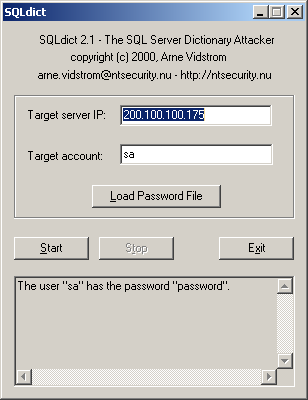
SQLdict :

         is a dictionary attack tool for SQL Server. SQLdict is a basic single ip brute-force MS SQL Server password utility that can carry out a dictionary attack against a named SQL account.


        The use of this tool is simple you just specify the IP address you are attacking, the user account you are up against and then load an appropriate wordlist to try via the Load Password File button


Oscanner : 

                is an Oracle assessment framework developed in Java. It has a plugin-based architecture and comes with a couple of plugins that currently do:

- Sid Enumeration
- Passwords tests (common & dictionary)
- Enumerate Oracle version
- Enumerate account roles
- Enumerate account privileges
- Enumerate account hashes
- Enumerate audit information
- Enumerate password policies
- Enumerate database links

Download Link :

Version 1.0.6 source oscanner_src_1_0_6.zip
Version 1.0.6 binary oscanner_bin_1_0_6.zip


Oracle Auditing Tool :

                                 Exploits some of the known vulnerabilities of Oracle. Includes SID Enumeration, Passwords tests [common/ dictionary]. Supports attachment of malformed shell codes with TCP packets for crashing the remote server or gain DBA privileges on it.

 Download Link : http://sourceforge.net/projects/oracleauditor/files/latest/download


Secure Oracle Auditor :

                                   is an Oracle auditing and Oracle security vulnerability assessment software which is capable of scanning multiple Oracle database servers. This Oracle security software provides Oracle audit tools, Oracle password tools, database scanner software and Oracle security tools for penetration testing.  Secure Oracle Auditor™ identifies the database security threats in Oracle database that contains significant and precious information which is essential for the organization's success.


Secure SQL Auditor (SQA) :

                                        is a SQL security software that conducts database server security auditing & includes vulnerability assessment tools for SQL database server. It is a network based SQL security assessment tool capable of scanning multiple database servers. Secure SQL Auditor™ performs the massive task of identifying vulnerabilities and threats present in MS SQL database server. It helps administrators in closing loopholes which provide direct access to SQL database servers and lead to monetary, reputational and informational losses.


Monday, 25 July 2011

Best SQL Injection Security Scanners


SQLIer

– SQLIer takes a vulnerable URL and attempts to determine all the necessary information to exploit the SQL Injection vulnerability by itself, requiring no user interaction at all.

Get SQLIer : Click Here


SQLbftools

SQLbftools is a collection of tools to retrieve MySQL information available using a blind SQL Injection attack.


Get SQLbftools : Click here

SQL Injection Brute-forcer –
SQLibf is a tool for automatizing the work of detecting and exploiting SQL Injection vulnerabilities. SQLibf can work in Visible and Blind SQL Injection. It works by doing simple logic SQL operations to determine the exposure level of the vulnerable application.

Get SQLLibf : Click Here

SQLBrute –
SQLBrute is a tool for brute forcing data out of databases using blind SQL injection vulnerabilities. It supports time based and error based exploit types on Microsoft SQL Server, and error based exploit on Oracle. It is written in Python, uses multi-threading, and doesn’t require non-standard libraries.

Get SQLBrute.

BobCat – BobCat is a tool to aid an auditor in taking full advantage of SQL injection vulnerabilities. It is based on AppSecInc research. It can list the linked severs, database schema, and allow the retrieval of data from any table that the current application user has access to. Get BobCat.

SQLMap –
SQLMap is an automatic blind SQL injection tool, developed in python, capable to perform an active database management system fingerprint, enumerate entire remote databases and much more. The aim of SQLMap is to implement a fully functional database management system tool which takes advantages of web application programming security flaws which lead to SQL injection vulnerabilities.


Get SQLMap : Click Here

Absinthe –
Absinthe is a GUI-based tool that automates the process of downloading the schema and contents of a database that is vulnerable to Blind SQL Injection.

Get Absinthe: Click here

SQL Injection Pen-testing Tool – The SQL Injection Tool is a GUI-based utility designed to examine database through vulnerabilities in web-applications. Get SQL Injection Pen-testing tool.


SQID –

SQL Injection digger (SQLID) is a command line program that looks for SQL injections and common errors in websites. It can perform the follwing operations: look for SQL injection in a web pages and test submit forms for possible SQL injection vulnerabilities.

Get SQID : Click here

Blind SQL Injection Perl Tool –
bsqlbf is a Perl script that lets auditors retrieve information from web sites that are vulnerable to SQL Injection.

Get Blind SQL Injection Perl Tool : Click here

SQL Power Injection Injector –
SQL Power Injection helps the penetration tester to inject SQL commands on a web page. It’s main strength is its capacity to automate tedious blind SQL injection with several threads.

Get SQL Power Injection : Click here

FJ-Injector Framework –
FG-Injector is a free open source framework designed to help find SQL injection vulnerabilities in web applications. It includes a proxy feature for intercepting and modifying HTTP requests, and an interface for automating SQL injection exploitation.

Get FJ-Injector Framework: Click here

SQLNinja –
SQLNinja is a tool to exploit SQL Injection vulnerabilities on a web application that uses Microsoft SQL Server as its back-end database.

Get SQLNinja: Click here

Automagic SQL Injector –
The Automagic SQL Injector is an automated SQL injection tool designed to help save time on penetration testing. It is only designed to work with vanilla Microsoft SQL injection holes where errors are returned.

Get Automagic SQL Injector: Click here

NGSS SQL Injector –
NGSS SQL Injector exploit vulnerabilities in SQL injection on disparate database servers to gain access to stored data. It currently supports the following databases: Access, DB2, Informix, MSSQL, MySQL, Oracle, Sysbase. Get NGSS SQL Injector.

Sunday, 11 April 2010

SQL Server Metadata

Many times when you need to troubleshoot an SQL Server issue, you will need to collect metadata about the server, databases, and server resources in general. Here we will briefly review the mechanisms to collect these metadata.

System Base Tables

SQL server maintains a set of tables that store information about all the objects, data types, constraints, configuration options, and resources available to SQL Server. These tables are called the system base tables.

  • Some of these tables exist in master database –> contain system-wide information.
  • Some exist in every database –> contain database specific information.

You can access these tables names only if you are logged in as a system administrator. You can access through:

  • Run sp_help
  • Run
    use master; 
    select name from sys.objects 
    where type_desc = 'SYSTEM_TABLE';


If you tried to select data from any of these system tables, you will got 208 error indicating that the object name is invalid. The only way to access these data is through dedicated administrator connection (DAC).


Keep in mind that these system base tables are used for internal purposes only within the database engine and are not intended for general use. They are subject to change and compatibility is not guaranteed.


Compatibility Views


Although it is possible to see data in the system tables in versions of SQL Server before 2005, it wasn’t recommended. For compatibility, SQL server 2005 and 2008 provided a set of compatibility views that allow access to a subset of the SQL server 2000 system tables. These views should be used for backward compatibility only; going forward, you should use catalog views.


Catalog Views


SQL Server 2005 introduced a set of catalog views as a general interface to the persisted system metadata. All the catalog views are in the sys schema, and you must reference the schema name when access the objects like:


select name from sys.databases;


For a complete list of catalog views categories, please consult http://msdn.microsoft.com/en-us/library/ms174365.aspx.


Information Schema Views


The information schema views comply with SQL-92 standard and all of it are in a schema called INFORMATION_SCHEMA. If you need to write a portable application that access the metadata you should use these views. This compliance come with the price of limited provided information (it provide the standard defined information only). If you need metadata about non-standard features, use catalog views.


For a complete list of Information schema views and its closest map to catalog views, please consult http://msdn.microsoft.com/en-us/library/ms186778.aspx


System Functions


Give us individual property values for many SQL Server instance, objects, databases. The values returned by system functions are scalar, so they can be used as values returned by SELECT statements like:


select DATABASEPROPERTYEX('msdb','Recovery');


For a complete list of system functions and its types, review http://msdn.microsoft.com/en-us/library/ms187786.aspx


System Stored Procedures


System Stored Procedures are the original metadata access tool but it had a drawback, basically you have to accept the data that it returns. Some of the procedures allow parameters but they are very limited. Catalog views are more enhanced and flexible in controlling what data appears.


I hope this brief post gives you an overall image about SQL Server metadata access mechanisms and which one to use according to your situation.