Showing posts with label ANDROID. Show all posts

Wednesday, 6 July 2016

Top 8 Best Encryption software

Top 8 Best Encryption software
Encryption software is software that can encrypt and decrypt data, often in the form of files on a hard drive or packets sent over a network. They uses an encryption scheme that encodes computer data so that it cannot be recovered without the correct key. These Software encryption is a fundamental part of modern computer communications and file protection.Many encryption algorithms and schemes exist for many different purposes. Public-key algorithms like RSA and ElGamal are used by HTTPS for encrypting web communications and by PGP for encrypting emails. Symmetric-key algorithms like AES operated in CBC mode are popular for encrypting individual files. Full disk encryption has different constraints, and so the now-defunct TrueCrypt used AES in XTS mode. Here below top 10 Best Encryption software written; Read on:

Top 8 Best Encryption software 

1. Boxcryptor
Boxcryptor is an easy-to-use encryption software optimized for the cloud allowing the safe use of cloud storage services without sacrificing ease. It provides fast and easy encryption for files and folders. The tool makes use of AES-256 and RSA encryption algorithms which are considered to give a top level of safety and are therefore utilized by governments and enterprises alike. For data backup and file synchronization between multiple devices different providers offer online storage to. The exchange of data to and from these cloud storage is unencrypted. To prevent unauthorized eavesdropping or tampering with these files, the company Secomba GmbH offers different versions of their software Boxcryptor.  Boxcryptor creates a virtual drive on the local computer. Any file that is stored here in an encrypted folder is automatically encrypted in the background and stored in a user selected destination folder. Here Boxcryptor encrypts individual files and creates, unlike TrueCrypt , no container. The file names remain legible in plain text. The file system used is to EncFS compatible. Boxcryptor runs under Windows, OS X, Android, iOS, BlackBerry 10, Windows Phone and with Google Chrome. The Android app supports SD card as storage.

2. Viivo
Viivo allows you to encrypt and securely view files stored in popular file sync-and-share services like Dropbox, Box, Google Drive, and OneDrive. Viivo ensures access to your files always remains with you. If you're the type of individual or organization that wants control over your files. Viivo integrates flawlessly with Windows and Mac and automatically finds out which cloud cellar tool is installed making the installation smooth. Viivo adds a new folder which can be utilized to drop files into. This tool connects to Dropbox and dispatches these encrypted files to a folder within Dropbox. Encrypted data gets a new file extension and Viivo will show the real file name. The service comes with features known as encrypted sharing which lets flawless and safe file sharing with multiple users.

3. OwnCloud 
OwnCloud is a suite of client-server software for creating file hosting services and using them. It is an open source, self-hosted file sync and share app platform. Access & sync your files, contacts, calendars & bookmarks across your devices. ownCloud gives a fabulous way to sync files while providing complete control to the user so the need to take care of encryption and other safety measures that come with running a server which is accessible via the web. The service flawlessly integrates into your IT infrastructure making you easily leave date where it lives and still deliver file sharing services that are in accordance with your data security and compliance policies.

4. SpiderOak 
SpiderOak is an US based online backup and file hosting service that allows users to access, synchronize and share data using a cloud-based server. This service needs zero-knowledge privacy meaning any file uploaded to their server is encrypted before it leaves the computer. It creates shared room that is password protected and you can access it via your personal email invite, file link or via a website embed. This service makes use of a nested system of many small encryption keys making it possible to split between various types of data either in your personal account or in your shared rooms.

5. Tresorit 
Tresorit is an online cloud storage service based in Switzerland and Hungary that emphasizes enhanced security and data encryption for Businesses. Tresorit for Encrypted cloud storage for your confidential files. Using Tresorit, files are encrypted before being uploaded to the cloud. Start encrypting files for free.goes to create a private Tresor on your computer where sharing and syncing occurs. This tool comes with the standard cloud storage features including Access statistics, two step verification, activity history, etc. Its basic account lets for one version of a file while the premium plan has the capability of 10 file versions.

6. Mega 
Mega provides 50GB for free along with file syncing client that is capable of working just like Dropbox does. This service allows you drag and drop files for easy syncing across multiple devices and share folders with co-workers and friends. End-to-End Encryption Unlike with other cloud storage providers, your data is encrypted & decrypted during transfer by your client devices only and never by us. Secure Global Access Your data is accessible any time, from any device, anywhere. Only you control the keys to your files. Secure Collaboration Share folders with your contacts and see their updates in real time. Online collaboration has never been more private and secure.

7. Sync
Sync lets you transfer files directly from device to device. Share photos, videos, docs without storage limits: our technology works especially well with huge files. Sync makes use of a 256-bit AES encryption on files and locks them with 2048-bit RSA private keys. This tool has the potential to see the keys clearly. Here, you can share your files with clients and colleagues and send secure links to your friends. This service is also a fully encrypted with zero-knowledge cloud service that makes it easy to store, share and access your files from everywhere with the guarantee of your privacy.

8. DiskCryptor 
DiskCryptor is a full disk encryption system for Windows that allows the encryption of an PC's entire hard drive or individual partitions including the ability to encrypt the partition and disk on which the OS is installed. DiskCryptor is a free solution offering encryption of all disk partitions including the system partition. DiskCryptor releases from 0.1 to 0.4 were fully compatible with TrueCrypt as they utilized a corresponding partition format and encrypted data with AES-256 algorithm in LRW mode. Its features include support for encryption algorithm, high performance, broad choice in configuration of booting, full support for external storage devices.

So which one is your favorite don;t forget to mention :)

Friday, 17 June 2016

12 Best Task Management, Note Taking & To Do list App

12 Best Task Management, Note Taking & To Do list App
Do you want to tackle your to-do list, Manage your task-project effectively and efficiently with team, take necessary daily notes, make lists, plans on your Android, IOS phone, Tabs. These Task Management, Note Taking & To Do list Application will help you at ease. Here below list to this Application given; Read on:

12 Best Task Management, Note Taking & To Do list App

1. Wunderlist
Wunderlist is an app for cloud-based task-project-management. It offers users to manage their tasks from a smartphone, tablet & computer. Wunderlist is the easiest way to get stuff done. Whether you're planning a holiday, sharing a shopping list with a partner or managing multiple work projects. It was developed in 2010 by startup 6Wunderkinder from Berlin, Germany.

2. Trello
Trello is a collaborating tool that helps you organize your projects into boards. Trello gives you perspective over all your projects, at work and at home. Whether it's managing a team, writing an epic screenplay, or just making a grocery list; Infinitely flexible. Incredibly easy to use. It's free. Trello keeps track of everything, from the big picture to the minute details.

3. Workflowy
Workflowy is a nice & smart tool it's Easy to use, but marvelously powerful, WorkFlowy is an organizational tool that makes life easier. It's a surprisingly powerful way to take notes, make lists, collaborate, brainstorm, plan WorkFlowy can help you manage all the information in your life. It also works as a single-pane out-liner with inline notes.

4. Toodledo
Toodledo is one of the most popular online productivity tools. Use it to manage your to-do list, take notes, organize ideas into outlines and make custom spreadsheet like lists for any purpose. It is a robust task and note manager, for the iPhone and iPad. You can utilize Toodledo as a stand-alone application, or you can synchronize with Toodledo.com, one of the most popular online task managers.

5. Redbooth
Redbooth is packed with helpful features to 
increase your team’s accountability and productivity, it's a Simple task and project 
management software with its intuitive design, Redbooth 
makes it easy for you and your team 
to plan and track your work. It create visual project timelines, Turn emails into action items, Integrate with your favorite apps and Work anywhere with mobile apps.

6. Fetchnotes
Fetchnotes is a simple way to keep track of notes & to do so you can stay in sync with the people that matter to your. Fetchnotes is always in a close proximity when inspiration strikes. Fetchnotes makes your chief content available no matter where you are and no matter what device you are using. It keeps you notes 100% private unless you choose to share them with another person.

ToDoList is a straightforward but efficient way to keep on top of your tasks, ToDoList is distinct form of task management tool, one that offers you to repeated sub divide your tasks into more manageable pieces whilst still presenting a sparkling and perceptive user experience. It saves you task list in SML which provides a number of opportunities for advanced formatting and printing using style sheets. 

Google Tasks is a extension adds a to-do list to Gmail. After adding the lab, click the Tasks link above the chat box on the left-hand-side of the page. You task list will become visible on the right click anywhere in the list and begin typing to add a task. Tasks are visible everywhere that you can see your Google Tasks - in Gmail, Calendar, iGoogle, Mobile and via the Google Tasks API. 

Task Coach is an open source to-do administrator to keep track of individual tasks and to-do lists. It is developed for composite tasks, and also offers effort tracking, categories, notes and more. With the passage of time, it has added budgeting, notes, priority adjusting, reminders, and many other features as well. 

Producteev is a social task management app for teams and groups. It’s truly potent yet impeccably simple to use. It has helped thousands of teams get work done quicker and faster. And it is absolutely free which is, obviously, the best aspect of Producteev. 

11. Asana 
Asana is the easiest way for teams to track their work and get results. From tasks and projects to conversations and notifications. Asana is simultaneously a web and mobile application designed to enable teamwork without email. It was developed by Facebook co-founder Dustin Moskovits and ex-engineer Justin Rosenstein, who both worked on perking up the productivity of employees at Facebook.

12. Cloudship 
Cloudship basically Task Management and Note Taking app for Android & IOS. Cloudship cloud app helps you to organize your tasks, store your notes and collaborate with your team. Everything in one tool, done in a simple and agile way. With this software, collaboration, assigning tasks, conveys commands to those who are assigned.

So which one you gonna use don't forget to mention :)

Saturday, 11 June 2016

Top 15 Android App Store/market

Top 10 Android App Store/market
An app store/marketplace is a type of digital distribution platform for computer software, often in a mobile context. Apps provide a specific set of functions which, by definition, do not include the running of the computer itself. Apps are designed to run on specific devices, and are written for a specific operating system (such as iOS, Mac OS X, Windows, or Android). Here below Top 15 Android App Store/market listed; Read on:


Top 15 Android App Store/market

1. Google Play Store 
Google Play is a digital distribution service operated and developed by Google. It serves as the official app store for the Android operating system, allowing users to browse and download applications developed with the Android SDK and published through Google. Google Play also serves as a digital media store, offering music, magazines, books, movies, and television programs. At present, there are millions of apps and games available at the Google Play Store for the Android devices. The services of Google Play Store can be access by two ways either by visiting the official website of the Google Play Store or downloading and installing the app of the Google Play Store.

2. Amazon App Store 
Amazon App Store for Android is an app store for the Android operating system operated by Amazon.com. It was opened on March 22, 2011 and was made available in nearly 200 countries. Developers are paid 70% of the list price of the app or in-app purchase. On September 28, 2011, Amazon launched the Kindle Fire tablet. The tablet, designed for media consumption in the Amazon ecosystem, relies solely on the Amazon App store for its marketplace, eschewing Google Play. Alongside the tablet was a new design for the Amazon App store designed to better integrate with the tablet's user interface.

3. 1Mobile Market 
1Mobile Market is one of the newest apps & games places where the exclusive download of games and apps is accessible. You will discover a great assortment of apps and games at 1Mobile Market and the downloading of the apps and games are certainly a piece of cake and most expedient at 1Mobile Market comparatively.

4. Android PIT 
Android PIT is the independent application store for the Android operating systems. It is the independent app store that in addition to listing the most of the apps of the Google Play Store provides own developed applications for the Android users as well. Android PIT is a not a dedicated platform for getting the apps only; it also deals in the recent Android news, new launched apps, hardware problems and solutions etc.

5. Blackmart Alpha
Blackmart Alpha is a superb utility allowing you download free apps on your Android phone and tablet device. It can be used as a substitute to Google Play Store that is the biggest app assortment for Android users. The way of working of Blackmart Alpha is different from most of the Android apps providers.

6. F-Droid 
F-Droid is an app store for the Android devices only from where the Android users can explore and download the tons of apps. In addition to providing the free apps, F-Droid provides those apps as well those are totally open source. This open source system of F-Droid makes the users able to examine the code of the apps to enhance their development and programming knowledge.

7. Slide ME 
Slide ME is an independent app market for the Android devices only where you will find that level of apps that are even hard to explore at the giant app platform of the Google Play Store. SlideME is an excellent market place for Android users with a lot of free apps and games from almost all popular app categories. It provides both free and premium apps and has devoted community.

8. App Brain 
App Brain is one of the leading Android apps directories over the internet. AppBrain is the giant platform of millions of apps. In addition to providing the apps, AppBrain deals in the management of apps as well. The best about AppBrain is that it even allows the users to share the apps downloaded from the AppBrain to their friends as well.

9. Mobo Market 
Mobo Market is the giant platform of the Android apps and games that are available for free to download, install and share; Every day comes with hundreds of fresh apps there. The best about MoboMarket is that it provides its users with the system of making the backup of their apps and restores the same in the time of emergency. MoboMarket provides the secure and safe apps for Android devices only.

10. Aptoide
Aptoide is a web app based app repository for the Android devices. Aptoide has the giant collection of apps for the Android devices that are compatible to run on any Android supported smartphones. Aptoide is said to be the replacement of the Google Play Store but at the same time is very different from the Google Play Store.

11. Get Jar 
Get Jar is an independent app provider for the multiple mobile operating systems specially for the Android devices. GetJar is a platform that is particularly developed for the purpose of providing the apps and games for the mobile operating systems. In addition to apps, GetJar deals in the themes, APK, games and lot of other stuff as well.

12. Fossdroid 
Fossdroid is the provider of free and open source games and apps for the Android operating systems. Fossdroid has the fine collection of apps for your Android device. It is not an independent app store because it is being backed by the F-Droid and most of the apps available here are the parts of the project of the F-Droid.

13. Get Apk 
Get Apk is among those leading app stores that in addition to providing the apps for the Android mobile devices provide the apps for the Android tablets and other Android based devices as well. The way of working of GetApk is based on the two methods that are either accessing it via its official website or using the app of the GetApk that is also available for free.

14. App Zuma 
App Zuma is the provider of hand-picked Android applications. Appzuma is an excellent market place for Android users with a lot of free apps and games from all frequent categories. It provides both free and premium apps and has devoted community that can rate apps and are firmly monitored and maintained so that the availability of best apps can be ensured.

15. Mobo Robo 
Mobo Robo is said to be the one of the most popular Android smartphone PC managers is also the provider of the tons of apps for free. MoboRobo has the robust market for Android applications that are many a time different to those that you encounter on the Android apps market of the Google Play Store.

So which service is your favorite don't forget to mention :)

Wednesday, 8 June 2016

Top 8 Best Android tablets (2016)

Top 8 Best Android tablets (2016)
There are probably hundreds of Android tablets on Amazon, & avoiding the overpriced and the plain bad can be daunting. But it doesn’t have to be that much hard. Here we made a list of the best Android tablets available so far in the year 2016. They got everything the very best Android has to offer; Read on:


Top 8 Best Android tablets (2016)

1. Google Pixel C
Google Pixel C
Google Pixel C is an Android tablet developed and marketed by Google. The device was unveiled during a media event on September 29, 2015. Google Pixel C is powered by a "big.LITTLE" octa-core; Nvidia Tegra X1 system-on-chip with 3 GB of RAM. Models are available with 32 GB and 64 GB of storage. The Pixel C features a 10.2 inches 2560×1800 resolution IPS panel with a pixel density of 308 ppi. The device ships with Android 6.0.1 "Marshmallow". An optional keyboard accessory is available for the Pixel C. The tablet can attach to the keyboard magnetically via a hinge, or the keyboard can be attached to the front or back of the tablet for storage. Google Pixel C is overpriced for what it offers, it’s available now from the Google Store starting at $499, with official accessories adding an extra $149 to your purchase.

Specs of Google Pixel C:
  • 10.2-inch LTPS LCD display with 2560 x 1800 resolution, 308ppi     
  • 64-bit 1.9GHz octa-core NVIDIA Tegra X1 processor     
  • 3GB of RAM; 32/64GB of on-board storage, no microSD expansion     
  • 8MP rear camera, 2MP front camera     
  • Non-removable 34.2WHr battery     
  • Android 6.0.1 Marshmallow     
  • 242 x 179 x 7mm, 517g
2. Nexus 9
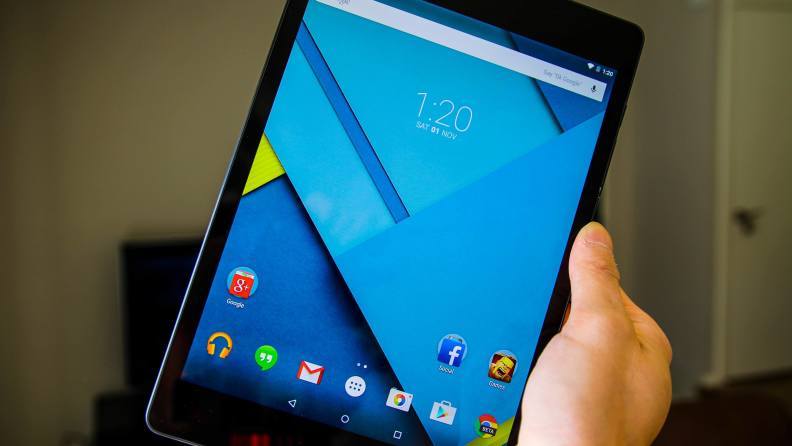
Nexus 9
Nexus 9 is a great Android tablet. It was created by Google and built by HTC. It runs the latest version of Android, and will continue to receive timely software updates for another year or so. The specs is It comes with an 8.9-inch display, a NVIDIA Tegra K1 processor, either 16 or 32GB of on-board storage, a big 6700mAh battery and weighs only 436 grams. Thanks to this device’s specifications, navigating around the device, switching applications, playing games and streaming movies or videos is a breeze. It also has a nice soft touch material on the back  that makes this tablet easy to hold, as well. The device is available in two storage sizes, 16 GB for US$399 and 32 GB for US$479.

Specs of Nexus 9:    
  • 8.9-inch IPS LCD display with 1536 x 2048 resolution, 281ppi     
  • 64-bit 2.3GHz NVIDIA Tegra K1 processor     
  • 2GB of RAM; 16/32GB of on-board storage, no microSD card expansion    
  • 8MP rear camera, 1.6MP front camera     
  • Non-removable 6700mAh battery     
  • Android 6.0.1 Marshmallow     
  • 228.2 x 153.7 x 8mm, 436g
3. Samsung Galaxy Tab S2 8.0
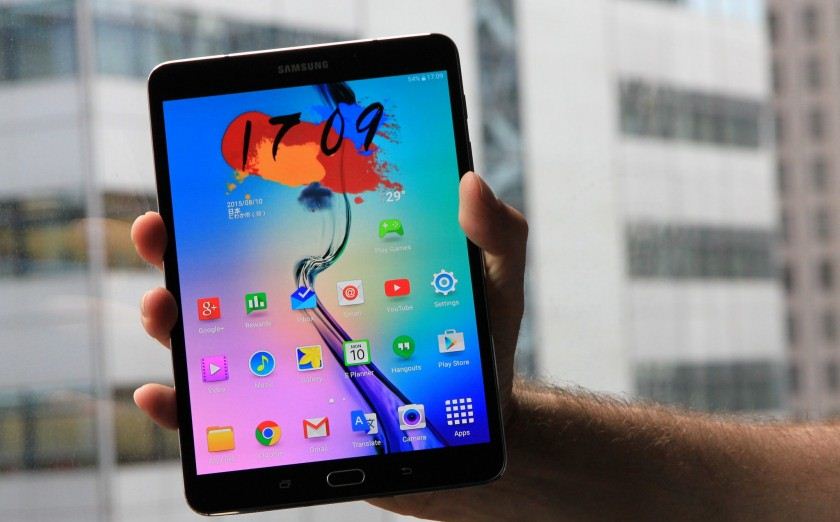
The Galaxy Tab S2 8.0 was announced on 20 July 2015 from a Samsung press release; The device runs Android 5.0.2 Lollipop with Samsung's TouchWiz software suite. The Galaxy Tab S2 8.0 is available in WiFi-only and 4G/LTE & WiFi variants. Storage ranges from 32 GB to 64 GB depending on the model, with a microSDXC card slot for expansion up to 128 GB. The display is a Super AMOLED screen with a resolution of 2048x1536 pixels. It also features a 2.1 MP front-facing camera and a 8.0 MP AF rear-facing camera without LED flash. The hardware home button serves as the fingerprint sensor. Don’t mistake it for the “little guy” in the playground, though. It has plenty of power to keep you going through all your tasks. It may be a bit too similar to an iPad, but it’s still a great Android tablet that many of you will enjoy.

Specs of Samsung Galaxy Tab S2 8.0:    
  • 8.0-inch Super AMOLED display with 1536 x 2048 resolution, 320ppi     
  • 1.9Ghz octa-core Samsung Exynos 5433 processor     
  • 3GB of RAM; 32/64GB of-on board storage, microSD expansion up to 128GB     
  • 8MP rear camera, 2.1MP front camera     
  • Non-removable 4000mAh battery     
  • Android 6.0 Marshmallow     
  • 198.6 x 134.8 x 5.6mm, 265g
4. NVIDIA Shield Tablet K1
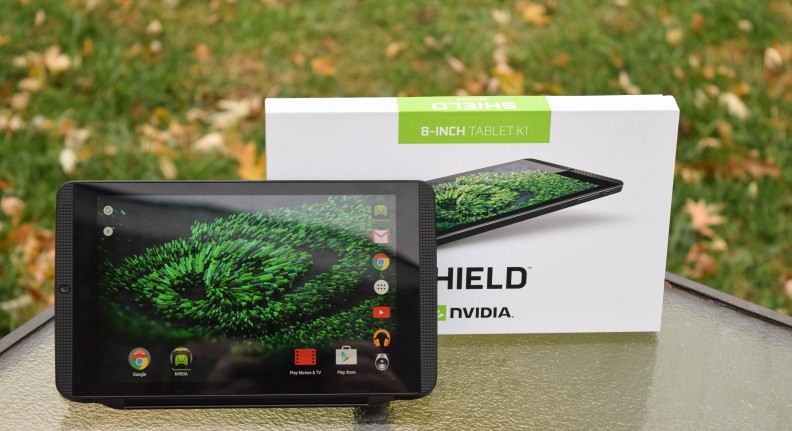
NVIDIA Shield Tablet K1
The Shield Tablet, later relaunched as the Shield Tablet K1, is a gaming tablet, developed by Nvidia and released on July 29, 2014. This is Nvidia's second portable gaming device that uses Android. Compared to the Shield Portable, the controller is not permanently connected to the screen, rather it can be purchased separately. Up to four controllers can be wirelessly connected at the same time. While the Shield tablet features an 8-inch 1920x1200 pixel display, it can output 4K resolution signal to a television via HDMI. NVIDIA removed the stylus holder on the K1, & the stylus is gone. This tablet is now only $200, which makes it not only one of the best Android tablets out there, but also one of the most affordable.

Specs of NVIDIA Shield Tablet K1:     
  • 8.0-inch LCD display with 1920 x 1200 resolution, 283ppi     
  • 2.2GHz quad-core NVIDIA Tegra K1 processor     
  • 2GB of RAM; 16GB of on-board storage, microSD card expansion available     
  • 5MP rear camera, 5MP front camera     
  • Non-removable 19.75WHr battery     
  • Android 6.0 Marshmallow     
  • 221 x 126 x 9.2mm, 390g
5. Sony Xperia Z4 Tablet
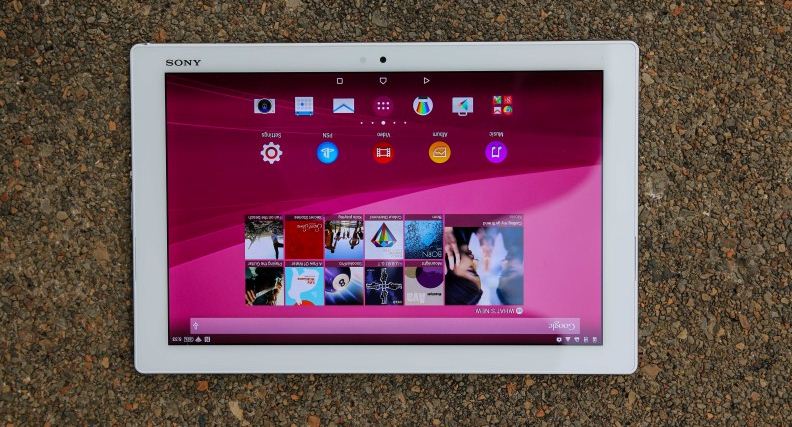
Sony Xperia Z4 Tablet
Sony Xperia Z4 Tablet announced on 2 March 2015, the Xperia Z4 tablet features a 2560x1600 resolution 10.1-inch screen and is water and dustproof with a rating of IP65 and IP68. The tablet is lighter and thinner than its predecessor, weighing at 0.85 pound for the WiFi model and 0.86 pound for the LTE model and is 0.24 inches thick. This is a sleek, thin and very attractive tablet offering from the company. It comes with a Snapdragon 810 processor, 3 gigabytes of RAM, plenty of on-board storage and microSD expansion up to 128 gigabytes. It also comes with a big 6000mAh battery that should be able to last a very long time on just a single charge. It should be noted that while this tablet still runs Android 5.0 Lollipop, Sony has plans to skip the 5.1.1 update and roll out Android 6.0 Marshmallow as soon as it’s ready.

Specs of Sony Xperia Z4 Tablet:     
  • 10.1-inch IPS LCD display with 2560 x 1600 resolution, 299ppi     
  • 2.0GHz octa-core Qualcomm Snapdragon 810 processor     
  • 3GB of RAM; 32GB of on-board storage, microSD expansion up to 128GB     
  • 8.1MP rear camera, 5.1MP front camera     
  • Non-removable 6000mAh battery     
  • Android 6.0 Marshmallow     
  • 254 x 167 x 6.1mm, 389g
6. Dell Venue 8 7000
Dell Venue 8 7000
Dell may not be the first name that comes to mind when talking about Android tablet OEMs, but the company really impressed us with its Venue 8 7000 series tablet. It’s one of the thinnest tablets available right now, measuring just 6.1mm thick. Additional specs include an 8.4-inch OLED display, an Intel Atom Z3580 processor, microSD expansion and two really great cameras for taking quick shots. It’s also running Android 5.1 Lollipop. It’s a tad awkward to hold, but that’s honestly one of the only downsides of this tablet. With an impressive performance and even better battery life, the Dell Venue 8 7000 manages to provide a lot, without the premium price point that would usually be associated with such a package.

Specs of Dell Venue 8 7000:     
  • 8.4-inch OLED display with 1600 x 2560 resolution, 359ppi     
  • 2.3GHz quad-core Intel Atom Z3580 processor     
  • 2GB of RAM; 16GB of on-board storage, microSD expansion up to 512GB     
  • 8MP rear camera, 2MP front camera     
  • Non-removable 5900mAh battery     
  • Android 5.1 Lollipop     
  • 215.9 x 124.2 x 6.1mm, 305g
7. Lenovo Yoga Tab 3 Pro
 Lenovo Yoga Tab 3 Pro
The Lenovo Yoga Tab 3 Pro is unique, much like other Lenovo devices, but this one is special. Lenovo added a full blown projector and stand. It is truly a media powerhouse. The Yoga Tab 3 Pro is a tad expensive, but considering the big display, projector, built-in stand and decent software experience.

Specs of Lenovo Yoga Tab 3 Pro:    
  • 10.1-inch IPS LCD display with 2560 x 1600 resolution, 298ppi     
  • 2.24 GHz quad-core Intel Atom x5-Z8500 processor     
  • 2GB of RAM; 32GB of on-board storage, microSD expansion up to 128GB     
  • 13MP rear camera, 5MP front camera     
  • Non-removable 10200mAh battery     
  • Android 5.1 Lollipop     
  • 247 x 179 x 4.68mm, 667g
8. Asus ZenPad S 8.0 (Z580CA)
Asus ZenPad S 8.0 (Z580CA)
The design of ASUS ZenPad S 8.0 carries modern influences and a simple, clean look that gives it a universal and stylish appeal. These elements are inspired by Zen design philosophy of balancing beauty and strength. ASUS ZenPad S 8.0 is an 8-inch tablet that is only 6.6mm thin, weighs just 298g. ASUS ZenPad S 8.0 is powered by the Intel® Atom™ Z3580 processor (quad-core, 64-bit) and has 4GB RAM.

So which one you gonna use don't forget to mention :)

Top 5 Best Android Smart Watch (2016)

Top 5 Best Android Smart Watch
Smart watch is a computerized wristwatch with functionality that is enhanced beyond timekeeping. While early models can perform basic tasks, such as calculations, translations, and game-playing, modern smartwatches are effectively wearable computers. Many run mobile apps, using a mobile operating system. Now days most popular Smart watch's are Android OS driven; Android Wear first announced back in 2014 since then it has become more evolving. In early days, there were only a few options, mainly from Motorola and LG. These days, many handset makers have thrown their weight into Android Wear. There are number of watches available and it increasing dramatically; that makes it hard to keep track of which watches stand out as the best. In order to help you make decision on which watch is right for you, we have narrowed down the list for you. Read on:

Top 5 Best Android Smart Watch (2016)

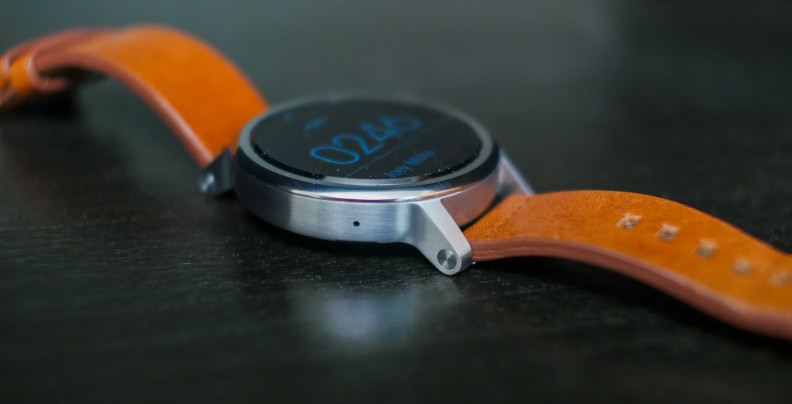
1. Motorola Moto 360 (2nd Generation)
The Moto 360 (2nd gen) is an Android Wear-based smartwatch. It was announced on September 14, 2015 at the IFA. The Motorola Moto 360 (2nd Gen) has a bigger battery than its predecessor, a Snapdragon 400 processor & comes in two different sizes to fit more users wrists. You will be able to customize it through Moto Maker. Overall, the biggest advantages the new Moto 360 brings to the table are the refreshed processing package, a customizable design and the addition of lugs that will make it much easier to swap out watch bands. The Moto 360 (2nd Gen) starts at $299.99, though pricing increases considerably once you start making customization's.

Specs of 42mm variant:     
  • 1.37-inch IPS LCD display with 360 x 325 resolution, 233ppi     
  • 1.2GHz quad-core Qualcomm Snapdragon 400 processor     
  • 512MB of RAM, 4GB of on-board storage     
  • 300mAh battery     
  • 42.0 x 42.0 x 11.4mm     
  • IP67 dust and water resistance  
Specs 46mm variant:     
  • 1.56-inch IPS LCD display with 360 x 330 resolution, 263ppi     
  • 1.2GHz quad-core Qualcomm Snapdragon 400 processor     
  • 512MB of RAM; 4GB of on-board storage     
  • 400mAh battery     
  • 46.0 x 46.0 x 11.4mm    
  • IP67 dust and water resistance
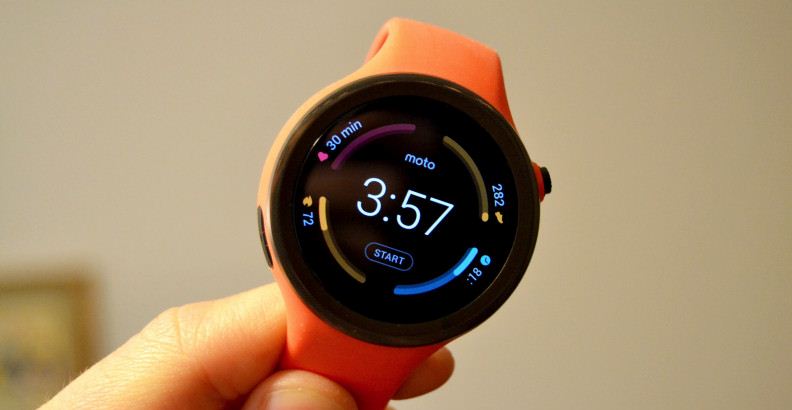
2. Moto 360 Sport
2. Moto 360 Sport
Moto 360 Sport has basically the same internal specifications as The Moto 360 (2nd gen), plus GPS tracking capabilities. The battery on this device does suffer a bit with the GPS turned on, but that can easily be forgiven when taking into account the watch’s other great features. It has a killer AnyLight Hybrid display that makes it super easy to see outdoors. This is the go-to Android Wear option if you need something to track your exercises. As of right now it only supports run tracking, but Motorola says more exercises will be added to the watch in the future. The Moto 360 Sport starts at $299.99.

Specs of Moto 360 Sport:
  • 1.37-inch AnyLight Hybrid Display with 360 x 325 resolution, 263ppi     
  • 1.2GHz quad-core Qualcomm Snapdragon 400 processor     
  • 512MB of RAM; 4GB of on-board storage     
  • 300mAh battery     
  • 45 x 45 x 11.5mm, 54g     
  • IP67 dust and water resistance.
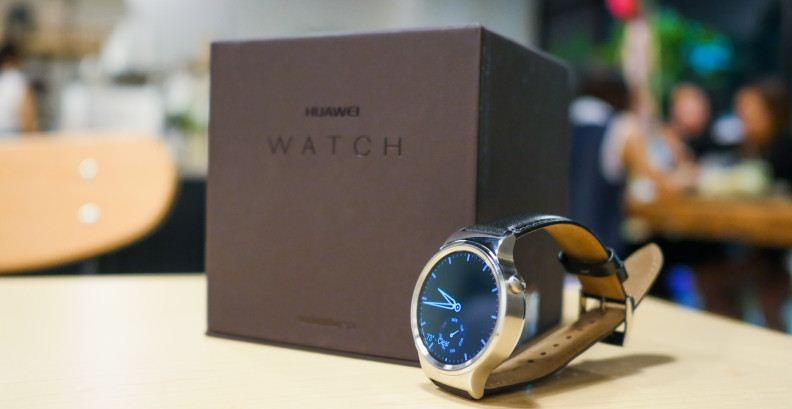
3. Huawei Watch
3. Huawei Watch
The Huawei Watch is an Android Wear-based smartwatch developed by Huawei. It was announced in 2015 Mobile World Congress on March 1, 2015. The Huawei Watch is based on the circular design of traditional watches, supporting a 42 mm AMOLED screen. The screen's resolution is 400x400 pixels and 285.7 ppi. The case is 316L stainless steel, covered with sapphire crystal glass on front and available in six finishes: Black Leather, Steel Link Bracelet, Stainless Steel Mesh, Black-plated Link Bracelet, Alligator-pressed Brown Leather and Rose Gold-plated Link Bracelet. The watch pre-installed Android Wear operating system and it works with iOS (8.2 and later) and Android (4.3 and later) devices. pricing is starting at $350.

Specs of Huawei Watch:
  • 1.4-inch AMOLED display with 400 x 400 resolution, 286ppi     
  • 1.2GHz quad-core Qualcomm Snapdragon 400 processor     
  • 512MB of RAM; 4GB of on-board storage     
  • 300mAh battery     
  • 42.0 x 42.0 x 11.3mm     
  • IP67 dust and water resistance 
4. LG Watch Urbane
4. LG Watch Urbane
LG Watch Urbane is an Android Wear-based that was released on April 27, 2015. It comes in either gold or silver, with 22mm swappable wriststraps and the watch has IP67 dust and water resistance. Powered by Qualcomm Snapdragon 400 SoC, 512MB of RAM and 4GB of eMMC storage. The OLED display is a POLED variant, with an equivalent resolution to a square display of 320x320, with capacities touch input. The watch has 9 axis movement sensors (gyro, accelerometer, compass), barometer, and heart rate sensor. The watch has a dual microphones (for noise reduction) which are used with Google Now's speech recognition. LG Watch Urbane costs $250 and if you’re looking for a more luxurious version a 23k gold version called the Watch Urbane Luxe cost you about $1,200.

Specs of LG Watch Urbane:    
  • 1.3-inch P-OLED display with 320 x 320 resolution, 245ppi     
  • 1.2GHz quad-core Qualcomm Snapdragon 400 processor     
  • 512MB of RAM; 4GB of on-board storage     
  • 410mAh battery     
  • 45.5 x 52.2 x 10.9mm     
  • IP67 dust and water resistance
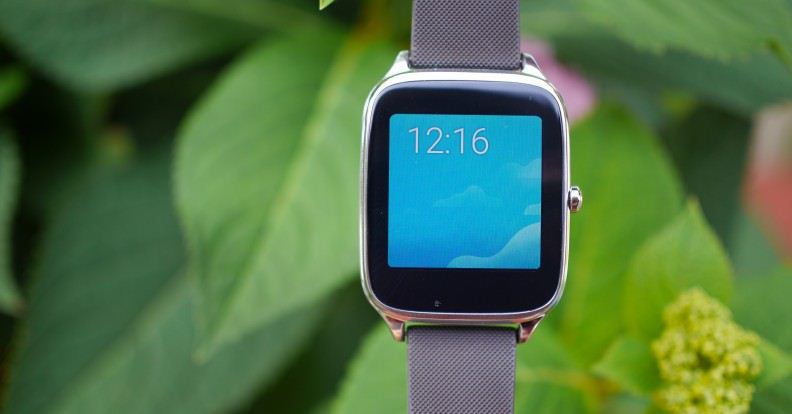
5. ASUS ZenWatch 2
5. ASUS ZenWatch 2
Original ASUS ZenWatch was one of the best Android Wear devices on the market for some time & now the company has brought a new model to market called ZenWatch 2. ASUS is going for the entry-level pricing market with the ZenWatch 2. The ZenWatch 2 comes with a square display, It has an AMOLED display that will help save precious battery life, a Snapdragon 400 processor, more than enough on-board storage for applications and music, as well as a 400mAh battery. You can even choose between a larger 1.63-inch model and a 1.45-inch model if you happen to have smaller wrists. ASUS ZenWatch 2 from Amazon starting at only $129.99.

Specs WI501Q (22mm) model:      
  • 1.63-inch AMOLED display with 320 x 320 resolution, 278ppi     
  • 1.2GHz quad-core Qualcomm Snapdragon 400 processor     
  • 512MB of RAM; 4GB of on-board storage     
  • 400mAh battery     
  • 49.6 x 40.7 x 10.9mm     
  • IP67 dust and water resistance  
WI502Q (18mm) model:      
  • 1.45-inch AMOLED display with 280 x 280 resolution, 273ppi     
  • 1.2GHz quad-core Qualcomm Snapdragon 400 processor     
  • 512MB of RAM; 4GB of on-board storage     
  • 300mAh battery     
  • 45.2 x 37.2 x 11.8mm     
  • IP67 dust and water resistance
So which one you gonna use; don't forget to mention :)

Sunday, 5 June 2016

6 Best ePub Readers for Android

6 Best ePub Readers for Android
EPUB is an ebook file format with the extension .epub that can be downloaded and read on devices like smartphones, tablets, computers, or e-readers. You can find a large number of  ePub Readers on Play-store but which one you should use; Here read on our recommended:


6 Best ePub Readers for Android

1. Moon Reader Pro 
Moon Reader Pro is a modern ePub reader that is built with powerful controls and intuitive features to give you good reading experience. It can support online eBook libraries and different text formats including ePub, txt, umd, chm, OPDS, html, pdf, fb2 and ZIP. It offers full vision options. You will have real page turning effects and customized Bookshelf design.

2. FB Reader 
FB Reader is fast and highly customizable; it can use external TrueType/OpenType fonts and custom backgrounds, the screen brightness can be adjusted while reading, and different day/night color schemes can be selected. FB Reader supports ePub, fb2, rtf, mobi and plain text files. In addition, this reader is localized for 34 languages, and includes hyphenation patterns for 24 languages. The app is open-source (GPL).

3. Cool Reader 
Cool Reader is another best ePub reader that packed with plethora of interesting features that would acquire attention of any book reader. Some of its features include ability to export bookmarks to text file, file browser and quick access to recently read books, online catalogs support, different profiles, customizable tap zone and key actions. It can support different formats like ePub, text, rtf, chm, pdb, fb2, doc, hmtl, tcr.

4. Mantano Reader 
Mantano Reader is a ePub and PDF documents reader. This modern application will let you read Adobe DRM-protected books and features ID or password protection. Its search function and option to share annotations and quotes with friends are key features of this application. With its advanced UI, the app lets you organized books in your collection. Allows to create annotations, highlights and bookmarks and Quickly access them.

5. Aldiko Book Reader
Aldiko Book Reader is a great alternative ebook reader and one of the best Pdf book read for Android. The app lets you buy eBooks at the lowest price. EPUB or Adobe PDF books can be easily imported from your SD card, and you can even also download directly ebook of your choice on Android device without using a computer to transfer files.

6. Kindle
Kindle for Android is one of the best android ebook reader. You can get the same experience on your phone or tablet with their Kindle app for Android. Similar to play books, users can download and Read Free Books; Choose from thousands of free ebooks and Easily shop for eBooks, including new releases and New York Times Best Sellers.

So which one is your favorite don't forget to mention :)

Saturday, 14 May 2016

10 Best Game Engines to use

10 Best Game Engines to use
A game engine is a software framework designed for the creation and development of video games. Developers use them to create games for consoles, mobile devices and personal computers. The core functionality typically provided by a game engine includes a rendering engine for 2D or 3D graphics, a physics engine or collision detection, sound, scripting, animation, artificial intelligence, networking, streaming, memory management, threading, localization support, scene graph, and may include video support for cinematic. The process of game development is often economized, in large part, by reusing/adapting the same game engine to create different games, or to make it easier to "port" games to multiple platforms. Here below Top 8 Best Game Engines listed, read on:

10 Best Game Engines to use

1. Unity 3D
Unity 3D is a cross platform game creation system developed by Unity Technologies, including a game engine and integrated development environment. It is used to develop video games for web sites, desktop platforms, consoles, and mobile devices. First announced only for Mac OS, at Apple’s Worldwide Developers Conference in 2005, it has since been extended target more than fifteen platforms. It is now the default software development kit (SDK) for the Nintendo Wii UI. Unity is a truly affordable option for a game developer, and it has some unmatched merits that other engines don’t. Unity is notable for its ability to target games to multiple platforms. Within a project, developers have control over delivery to mobile devices, web browsers, desktops, and consoles. Supported platforms include BlackBerry 10, Windows Phone 8, Windows, OS X, Linux, Android, iOS, Unity Web Player, Adobe Flash, PlayStation 3, PlayStation 4, PlayStation Vita, Xbox 360, Xbox One, Wii U, and Wii. It includes an asset server and Nvidia’s PhysX physics engine.

Features:   
  • Direct3D on Windows and Xbox 36
  • OpenGL on Mac, Windows, Linux, Android and iOS     
  • Mapping (Bump, Reflection, Parallax, Shadow maps render-to-texture)    
  • Screen space ambient occlusion
  • Best licensing terms in the game industry. Gotta pay for the license once.    
  • Easy to use and compatible with every game platform (Low learning curve)
  • Great community support (Popular option among developers) 

2. The Unreal Engine 
Unreal Engine is a game engine developed by Epic Games, first showcased in the 1998 first-person shooter game Unreal. Although primarily developed for first-person shooters, it has been successfully used in a variety of other genres, including stealth, MMORPGs, and other RPGs. With its code written in C++, the Unreal Engine features a high degree of portability and is a tool used by many game developers today.  Unreal Engine is one of the top ranked game engines to develop high-end triple-A titles. It was this engine which had been utilized to develop world famous games such as: Batman: Arkham Asylum, Gears of War,  Mass Effect, and many other blockbusters.

Features:   
  • The current release is Unreal Engine 4, designed for Microsoft's DirectX 11 and 12 (for Microsoft Windows, Xbox One, Windows RT); 
  • OpenGL (for OS X, Linux, PlayStation 4, iOS, Android, Ouya and Windows XP); Vulkan (for Android); Metal (for iOS) ;and JavaScript/WebGL (for HTML5 Web browsers).
  • Unreal Engine comes with several lifetime hours of video tutorials and resources are accessible
  • Best support and update mechanism of all engines, with a new tool introduced with each new update.
  • A plenty of easy maneuver tools a number of them are so simple that could be handle by a child. There is widest range of easy to maneuver tools up under its sleeve. 
  • So many developers using it, Unreal offers the largest community support. 
3. Rage Engine 
Rockstar Advanced Game Engine (RAGE) is a game engine developed by the RAGE Technology Group at the video game developer Rockstar San Diego with contributions by other Rockstar studios. The engine has been used on several different platforms such as Microsoft Windows, Nintendo Wii, PlayStation 3, PlayStation 4, Xbox 360 and the Xbox One. RAGE initially evolved from the Angel Game Engine originally developed by Angel Studios for use in the sixth generation console era versions of the Midnight Club series and other Rockstar San Diego games. This is one of the unique engines that offer a wide range of powers. The multi-functionality is one of the basic reasons behind its vast popularity. This engine is responsible for developing games like Grand Theft Auto V, Red Dead Redemption and many other blockbusters.

Features:   
  • Great capability for handling large streaming worlds and weather effects.     
  • Unmatched in handling complex A.I.s.     
  • Multitude of gameplay styles for the developer to work upon.     
  • Fast network code.     
  • Very attractive graphics.  
4. CryEngine 3
German/Turkish game studio Crytek announced that it would introduce CryEngine 3 at the 2009 Game Developers Conference, held from March 25 to March 27. The new engine was being developed for use on Microsoft Windows, PlayStation 3, Xbox 360, and Wii U. As for the PC platform, the engine is said to support development in DirectX 9, 10, and 11. As of June 1, 2009, it was announced that Crysis 2 would be developed by Crytek on their brand new engine. CryEngine 3 was released on October 14, 2009. This game engine has received praise for beautiful graphics output. If you have a knack for pretty game visuals, this can be the ideal game engine for you.

Features:  
  • CryEngine 3 makes the game ambience pretty with its artist level programming capability in its Material Editor, Flow graph, Track View Editor tools
  • Real time soft particle system & integrated FX editor: Procedural Placement Tools & Cover and Integrated vegetation & terrain cover generation system, Road & river tools, Vehicle creator.
  • Streaming, Performance Analysis Tools, Visual Budget System, Multi-core support and UV Mapping Editor & PBR (Physically Based Rendering) 
  • The game engine also offers the easiest A.l. coding  tech: Fully Flexible Time of Day System, Real time dynamic global illumination
  • Integrated multi-threaded physics engine, Deformables and soft body physics, Interactive & destructible environment
  • It has the most powerful audio tool: In-game sound mixing & profiling, Dynamic sounds & interactive music, Environmental audio
5. Havok Vision Engine 
Havok Vision Engine is a cross-platform game engine that provides a powerful and versatile multi-platform runtime technology ideally suited for all types of games and capable of rendering extremely complex scenes at smooth frame rates. Havok SDK was unveiled at the Game Developers Conference in 2000. The current release, Havok Version 2011.2, released in September 2011, is known to work on Microsoft Windows, Xbox and Xbox 360; Nintendo's GameCube and Wii; Sony's PlayStation 2, PlayStation 3, and PlayStation Portable; Linux; and on Mac OS X. In March 2011, Havok showed off a version of the Havok physics engine designed for use with the Sony Xperia Play, or more specifically, Android 2.3 During the Microsoft's //BUILD/ 2012 Conference, Havok unveiled full technology suite for Windows 8, Windows RT and Windows Phone 8.

Features:  
  • Providing a well-designed, clean and object-oriented C++ API, the technology includes a variety of features to help developers break through technical barriers
  • Havok Vision Engine is multi-threaded and optimized for Windows (DX 9, DX 11), Windows 8, Xbox360, PlaySTation3, Nintendo Wii, Wii U, PlayStation Vita, iOS and Android It is also an ideal solution for online distribution via XBLA, PSN, and WiiWare.  
  • Large, Customizable Feature Set with High-Performance and Stability     
  • Engine Extensibility, Customizable, Streaming
  • Licensees are given access to most of the C/C++ source-code, giving them the freedom to customize the engine's features, or port it to different platforms although some libraries are only provided in binary format.  
6. HeroEngine
HeroEngine is a 3D game engine and server technology platform originally developed by Simutronics Corporation specifically for building MMO-style games. At first developed for the company's own game Hero's Journey, the engine won multiple awards at tradeshows, and has since been licensed by other companies such as BioWare Austin. This game engine has earned wide acclaim in massive multiplayer and online game circles: you can see its results in Star Wars: The Old Republic. The licensing terms seems a bit heavy for new developers and startups, but it’s worth considering if you have a really ambitious project in hand.

Features:   
  • HeroEngine also works with technology from third-party vendors, such as FMOD, PhysX, SpeedTree, Wwise, Scaleform, and Vivox, as well as having plugins for 3D Studio Max and Maya.
  • The engine has online creation. Example, 1 developer can be creating a house and the entities inside, while another 1 works on the landscaping and terrain around it. Each sees the other's work in real time.
  • It offers several open-world maps and lively instances. It also offers a seamless transition between them.     
  • Offers fairly robust A.I.s. And Cloud support for client server with HeroCloud.
  • Easy and handy mapping tools and integrated tool set.     
  • The scripting is powerful enough to help you develop complex missions, crafting, and gathering resources.     
ShiVa3D is a 3D game engine with a graphical editor designed to create applications and video games for desktop PCs, the web, game consoles and mobile devices. Games made with ShiVa can be exported to over 20 target platforms, with new export targets being added regularly.  Numerous applications have been created using ShiVa, including the Prince of Persia 2 remake for Mobiles and Babel Rising published by Ubisoft. Games for the ShiVa Engine are made with the ShiVa Editor, a WYSIWYG RAD tool designed to let developers create 3D games and application in a fraction of the usual time.  ShiVa Editor 1.x runs exclusively on Windows XP/Vista/7/8/8.1. Since not all platforms have SDKs for Windows, the Authoring Tool is available for Mac OS X as well as Windows.

Features:   
  • Engine runs natively on a wide variety of target platforms, including Mobiles, Desktop PCs, Web Browsers and Game Consoles     
  • Support for both 32bit and 64bit operating systems: Lua API with native C++ completion support    
  •  Rendering in OpenGL, DirectX 9 or 11, and OpenGL ES modes     
  • Mealtime point and directional lights with screen space blurred cascaded shadow maps, Full light map control and Mealtime mesh modification API with morphing support, Chunked terrain and ocean rendering
  • Material overrides, particle systems and Polygon Trails, post processing effects like Bloom, Depth of Field, Motion Blur and Camera Distortion     
8. Project Anarchy
Project Anarchy is a powerful game engine is acclaimed by many game developers for its vivid and comprehensive documentation. It has absence of Mac and Linux development environment. Plus It’s costly for a new developer and startups.

Features:   
  • Project Anarchy offers free game development on mobile (on major platforms including iOS, Android, and Tizen).     
  • Project Anarchy has strong debugging tools.   
  • Solid documentation and sample is accessed through the editor and active developer community and forums.   
  • Project Anarchy has robust Havok A.I.     
  • Lots of customization options for developers with vForge. 
9. GameMaker: Studio
GameMaker: Studio is a proprietary game creation system created by Mark Overmars in the Delphi programming language. GameMaker accommodates the creation of cross-platform and multi-genre video games using drag and drop action sequences or a sandboxed scripting language known as Game Maker Language, which can be used to develop more advanced games that could not be created just by using the drag and drop features. GameMaker was designed to allow novice computer programmers to be able to make computer games without much programming knowledge by use of these actions.

Features:   
  • Simple and straightforward for all basic and advanced elements.     
  • One programming language (GML) to involve with. No need to deal with memory management or tasks like multithreading.    
  • GameMaker accommodates redistribution on multiple platforms.[10] The program builds for these platforms: Windows, Windows 8, Mac OS X, Ubuntu, HTML5, Android, iOS, Windows Phone 8, Tizen, Xbox One, and Playstation.
  • It is used to further enhance and control the design of a game through more conventional programming, as opposed to the drag and drop system.
  • GameMaker primarily runs games that use 2D graphics, allowing the use of limited 3D graphics. It supports the ability to create particle effects such as rain, snow and clouds, however not natively in 3D except through use of Dynamic Link Library.
10. GameSalad
GameSalad Creator is an authoring tool developed by GameSalad, Inc; aimed primarily at non-programmers for composing games in a drag-and-drop fashion, using visual editors and a behavior-based logic system. It is used by consumers and creative professionals such as graphic designers, animators, and game developers for rapidly prototyping, building and self-publishing cross-platform games and interactive media. The application runs on Mac OS X for producing games for iPhone, it also runs on Windows which is optimized for producing games on Android devices although games developed on Windows have to be converted to Mac OS files to be published to the App Store, web browser-based content in HTML 5, and Android applications.

Features:   
  • GameSalad has one common web-based interface for publishing to multiple platforms such as the iPhone or Mac. GameSalad can also publish to Android-based devices such as the Nook, to Windows 8 as a Metro style application, and to the web as an HTML5 widget.
  • Real-time editing - Users can edit a scene while the game is running.
  • Game preview - GameSalad has a specific preview mode for debugging and testing the performance and memory usage of games on the desktop and the iPhone.
  • Integrated physics - GameSalad uses a rigid-body physics simulator for handling realistic motion and collision.
  • Expressions - For advanced users, GameSalad has an expression editor to define complex behavior and state changes with mathematical expressions and a library of functions.
11. Coronalabs
Corona SDK is a cross-platform framework that allows developers to create 2D games and apps up to 10x faster than other platforms using easy-to-learn Lua. Their elegant APIs make adding complex features easy, Corona Ads lets you monetize quickly, and our workflow lets you see changes instantly.

Features:
  • Corona allows you to publish to all the major platforms and is best-in-class for code reusability. Forget about crazy fragmentation.
  • Supports major platforms, iOS (including tvOS) , Android (including Android TV), Kindle, Windows Phone 8, Mac and Windows desktop.
  • 100% Free, Easy to learn, Real time testing, Dedicated community.
  • Corona SDK has its own built-in monetization platform, Corona Ads. Pair that with our extensive plugin marketplace with best-in-class monetization and measurement solutions. 
  • In addition, with Corona Enterprise, you can even call any native API or library from your Corona app.
So which one you are going to use, don't forget to mention :)

Friday, 11 March 2016

10 Best IDE Apps for Android

10 Best IDE Apps for Android
IDE commonly refer to An integrated development environment like a software application that provides comprehensive facilities to programmers for software development. IDE normally consists of a source code editor, build automation tools and a debugger. Once there were IDE just for computer but Now days there is a lot of IDE can be found for mobile and tabs too. And here I'm featuring 10 Best IDE Apps for Android devices. This list filtered down to only 10 best IDE's from vast Play store's IDE all collection. All best IDE names and information given below. Read on

10 Best IDE Apps for Android


1. DroidEdit 
DroidEdit is a very lucrative source code editor which makes use of syntax highlighting for manifold languages that include: C/C++, Java, C#, HTML, Javascript, Python and SQL. Besides, it also has a number of colorful themes, search and replace, auto and halt indentation, and keyboard shortcuts among many other belongings. Although DroidEdit is quite useful editor for Android but this list is aimed to present some of the best utilities which could be used as substitute to DroidEdit. Pro version unlocks most of cool features.

2. Java Code Viewer 
Java Code allows you view java code, besides you can also view C#, C/C++, CSS, PHP, ASP and JavaSCript. The tool has fine syntax highlighting, word find, and line numbers. Therefore, if you are seeking a quite easy, simple, easy to use code viewer, Java Code Viewer might be the tool made for you.

3. AIDE
AIDE is an awesome tool allowing you program Android applications directly on your Android device. In this way, the users basically cut out the middleman of having to use a computer at all. The tool is totally compatible with Eclipse projects. Hence it is easy to transfer your projects from your system to your mobile device. Moreover, AIDE contains plenty of features and most important of them is Dropbox compatibility.

4. Terminal IDE 
Terminal IDE is an extremely cool IDE for programming Java/Android tool. It includes features like Custom ASCII on-screen ‘soft’ keyboard and a generic external ‘hard’ keyboard key mapper. Hence, user is facilitated to use CTRL, ALT, ESC and other keys that aren’t on the usual Android keyboard.

5. C4droid  
C4droid is a nice C compiler that can be used on your Android device. It makes use of the gcc compiler which is often used on Unix. C4droid can also compile C++, but at the moment you need to root your phone to get access to this attribute. The tool is a productive way to compile your C code on the fly.

6. 920 Text Editor
920 Text Editor runs of Android to provide a robust text editor to its users who can get benefits from the tool anywhere and anytime. With this utility, you can easily view or edit your code, along with use it as e-book reader to open text of any text file. It features syntax highlighting which includes: ASP, ActionScript, C/C++, C#, Erlang, CSS, JavaScript, Java, JSP, Perl, Pascal, Fortran, ColdFusion.

7. Syntax Highlighted Code Editor 
Syntax Highlighted Code Editor is a lightweight editor supporting HTML, CSS, JavaScript and PHP besides, C/C++, Java, and Python. Some of its attributes include search and replace, undo and redo, and on-screen keyboard helpers. On the whole, Syntax Highlighted Code Editor is an extremely simple editor, but is somehow overshadowed by free versions of compilers and IDEs.

8. Deuter IDE 
DeuterIDE comes with its notion ‘Light platform, Heavy coding’, as it is rich-featured IDE with support for up to 40 languages. It's an IDE that can be utilized to program in a plethora of languages, The features include: syntax highlighting, automatic indentation and dropbox sync. It also integrates virtual keys for generally used programming symbols, making good use of the virtual keyboard with it.

9. Android Java Editor 
Android Java Editor is aimed at providing simple editing solution. With this client users can create projects, and edit the source code and xml files directly on their device. As it is merely an editor, users can’t really compile and run the application using Android Java Editor.

10. Code Peeker 
Code Peeker is a very lightweight code reader allowing you to view code really rapidly. It comes with supporting syntax highlighting for a plethora of languages, and when it doesn’t support the language, it will still open the file in the form of plain text. The tool is quite lucrative when you are programming on your computer and wish to use your phone as an external monitor to keep other code open as a reference.

So which one you use and which one I didn't mentioned please note in comment. :)

Friday, 6 November 2015

UX/UI design tips for a captivating mobile app : Your 10 point bible

UX/UI design tips for a captivating mobile app : Your 10 point bibleBeing a mobile app development company we know that user experience can make or break a mobile app (depending on wether it’s awesome or horrendous). Mastering it right hinges on a good User Interface and right communication with the user.

For an independent developer whose sole product is a mobile app, it’s challenging indeed. And for someone who is employed as a UX/UI designer, it is even less of a joyride as the added pressure of client’s monetary investment is involved.

Further ordeals occur when the developer is dealing with payment apps where additional care has to be taken as one is tasked with designing for an acute interaction. Acute because they are dealing directly with the end user’s money. UI designing in this space requires utmost thoughtfulness because it requires a great level of attention to detail and consistency across technology touch points : from users’ as well as developer’s ends.

Sharp, efficient and secure are the watchwords for creating an awesome mobile app and they should apply to every UX on your to-do list. Also, it is essential for one to consider some factors that help in delivering an ideal app in terms of user engagement.

We create a roundup of ten simple tips, factors and aspects that every User experience/User interface designer must keep in mind before and while developing their mobile app.

Adhere to the OS guidelines for creating an exceptional app user interface

Sticking to multiple user guidelines belonging to target operating systems is a must when designing your app’s user interface. Exploring innovations with the navigation systems, touch gestures and interactions is highly recommended. This will not only enable you to achieve user interface design in an improved format but allow you to pick crucial features and reject the unnecessary ones.
Apps are analyzed rigidly before being launched on major app stores like Apple Store and Google Play. Therefore, before submitting their apps, developers must take some time out to analyse the type of apps that make it to these stores (in terms of UI/UX). They must read and follow the guidelines that have been put forth for creating the UI of an app for each OS.

Interactive design
UX/UI design tips for a captivating mobile app : Your 10 point bible

Mobile app UI designs don't give much room to work with, As a developer has to design for smaller screens and much smaller attention span, the design must work in sync with the user’s speed of thought. An ideal interface is one which is simple for novices without making it too boring for experienced ones.
And lack of screen space does not negate the need for a good interaction design.
The prime aspects of good interactive design are :

1.    It is goal driven
As a UI developer you have to design for the right user, therefore an extensive user research helps in creating a persona of those people who will be using the app. This gives you precise goals for them and tailor your app (and workflows) accordingly.

2.    Usability
If they can’t easily use it, they will uninstall it. Usability goes a long way in making an app useful. And useful, is desirable.

3.    Signifiers
Users must not have to think what each UI element does. You must use signifiers accordingly. Ex: blue underlined text means that upon clicking it, user will navigate to another page.

4.    Learnability
Users must know how to use an app interface in a short span of time, without training. It has to be instinctive. Familiar design patterns help users get accustomed to the app.

5.    Response
Users must know that their task was complete. It can be accomplished through a beep, a text prompt or something complex like a modal window. A developer must ensure that their response is beautiful and quick.

Flat design and full screen navigation

Flat design:
Sophisticated yet simple. Dynamic yet adaptable. A lot of app developers are adopting it owing to smooth user interfaces. Moreover, due to smaller file sizes, elements load faster. And this feature is very important for ecommerce mobile apps as too much time lapse can cause prospective visitors to leave their sites.
Being a trending design fashion, they give a clean structure to your mobile app. This optimizes User Experience on your app, increasing conversion. Flat user interface is the leading mobile design pattern of 2015, and it is strongly backed by Google’s design language called material design.

Fullscreen navigation:
The mobile application development and design industry has witnessed the rise of Fullscreen navigation feature. Unlike the conventional apps and pages where a typical title-banner-content-ad format is seen, in full screen navigation user is presented with a big menu having multiple actions. The prime valuable feature is that it fits very well with flat design.

Layered design:
Owing to the small screen of mobiles, panoramic view isn’t possible. This gives rise the need for layered design interfaces. For that, ther widgets should be active in the front and passive at the back.

  
Speedy path to action
UX/UI design tips for a captivating mobile app : Your 10 point bible
The user’s “path to action” should be as quick as possible.. For ex: In case of e-commerce mobile apps, the path to shopping should be made as short as possible in order to decrease the chances of cart abandonment. NO design must get in the way or slow down the user from “completing” what they have set out to do , in your app. Filling out information or data is the number one cause of what slows down the user. Therefore user input must be made as smart as possible. Instead of including fields for city and state, one can use zip code API to fill the gap, the first few digits of the credit/debit card can be used for getting the card type, instead of asking the user to enter that.

Social media integration and login

Social media plays a major role in mobile apps.Integration with social media networking platforms such as Facebook, Google, Twitter etc enhances the feature list of a mobile app. It works as a marketing means for gathering other audience and users as current users can ask their friends to try it out via various promotional means.

Social media login
As we explained earlier, a user’s path to action should be shortest. When you give the option for logging in/signing up with a social media account, users (who have short attention span and are time constrained due adding various activities in their daily schedule) give it much preference and a sigh of relief as compared to when they have to fill out huge forms for signing in. They may even uninstall the app simply because they are irritated.

Login via social media not only save them time but also the pain of remembering various login credentials of different apps.

UX/UI design tips for a captivating mobile app : Your 10 point bible
The 80/20 rule
While designing a mobile app, the designer must remember the 80/20 rule. According to this, 80% of app users use just 20% of it’s functionality. Therefore, the designers must first identify the functionalities that are used most within the app and trim down the app features as per those. If that crucial 20% of the functionality has been embodied in the app, then be assured that you have built a successful app as per UX/UI point of view.

Our fingers are getting fatter!!!
Yes we are getting fatter. So are our fingers. Mouse cursors are pixel precise. However, fingers are not. Thus app designs should have buttons, spaces etc that allow users to tap accurately. The design should be finger friendly.

Avoiding technical jargon
Remember that your users are not from IT background, so jargon is alien to them. Make the language and content in your app warm and familiar as per your target audience. Moreover, keep in mind that if something looks odd, your users will not trust it.

Instructions and FAQs
Your users will require some guidance through the first few uses. For first time use, have tutorial and guidance elements that are graphical in nature. Also create an inbuilt FAQ session if necessary.

Involve actual users while evaluation
It works. Trust us. Moreover, if you do this at an early stage of your mobile app development, you will get the fair practise of the 80/20 concept mentioned above. You will know which features are unnecessary. Also, re-working will be reduced.

UX/UI design tips for a captivating mobile app : Your 10 point bible
The windup
A mobile app developer can intelligently come up with clutter free designs using the above principles and concepts to ensure that their apps are worthwhile and awesome from the UI/UX perspective.

About the Author:
This is Amanda Cline and am working as a senior developer with Xicom Technologies Ltd- a leading Android App Development Company. When not busy developing great iOS apps, I feel proud in blogging and rendering IT support to individuals and enterprises.